Rig and animate a 3D character with AI in Blender with an auto-rig, one retargeter, foot IK and four motion sources, measured for slide, jitter and cost.
To rig a 3D character and animate it with AI, you need two things that work together: a rig that a motion source can drive, and a retargeter that moves that motion onto your character without wrecking the feet. @Christos_antono built both in Blender 5.2 on Patch's Cloud Blender, then fed one character motion from four places: AI video, the Mixamo library, Patch's own two-camera capture (AnyMove) and a text-to-motion model. Every clip was measured with the same camera and the same ruler.
The result is 4 methods, 5 actions (walk, jump, punch, wave, dance), 16 clips on one rig, and $13.70 spent in total.
Top left: the Seedance 2.5 video. Then the rig driven by Seedance + GVHMR, Mixamo's Silly Dancing and HY-Motion 1.0. AnyMove only ran the jump.
This article walks through the whole pipeline in the order it was built: finding the joints automatically, building a 22-bone rig, the world-space retargeter, each of the four motion sources, the foot fix that mattered more than any source, and what each method costs. By the end you'll know how to get one rigged character playing walk, jump, punch, wave and dance from four sources, and how to keep its feet on the floor. You don't need to write any code: where you'd do the work, there's a prompt you can hand to your coding agent. It uses Patch's CLI, pch, which runs Blender 5.2 on Patch's Cloud Blender, with a GPU when a step needs one.
The short answer
AI video is now a usable mocap source. Seedance 2.5 films the character, GVHMR traces a 3D skeleton from the video, and the retargeter puts it on the rig. About $2.40 and 5 minutes a move, with real weight shifts in the motion.
Mixamo's library still has the most natural-looking motion, and it's free. But it's a fixed set of clips, and its auto-rigger failed 6 times out of 6.
HY-Motion text-to-motion is the fastest way to a custom move: 3 seconds and under a cent a move. Sometimes it needs a second seed.
AnyMove reads its own video most accurately: 2.1 cm mean joint error on a known test motion. On a human it costs about 41 minutes of setup per character (dataset and training), and humans already have pretrained trackers.
The retargeter matters as much as the source. Feet were the main defect everywhere. Leveling the feet plus a leg-IK pass cut foot slide on all 15 clips and lifted sunk feet from 2 to 8 cm under the floor to 2.6 cm or less, most of them to about 1 cm.
Every jump from AI video floats. Their flights imply gravity of 1.6 and 3.2 m/s² instead of 9.81.
What you need
Blender 5.2, with NumPy and ffmpeg. We ran Blender on Patch's Cloud Blender.
Patch's CLI, pch, which drives Cloud Blender for your agent: every prompt below uses it.
A humanoid character in a T-pose or A-pose. Ours was made with MakeHuman's MPFB2 add-on: a young man in a white T-shirt, jeans and shoes, 1.80 m tall, A-pose, about 17k vertices, real fingers, 7 meshes. Body and clothes are CC0.
MediaPipe Pose, to find the joints.
For each motion source (you only need the ones you use):
AI video: Seedance 2.5 through fal, and GVHMR on a GPU (we used an A10G on Modal).
Library: a Mixamo account (free with an Adobe ID).
Text to motion: HY-Motion 1.0 on a GPU (an L40S on Modal).
Two-camera capture: AnyMove, MiniMax H3 Max through fal, and an NVIDIA GPU to train its reader (we used one H100 on Modal).
Budget: our whole test cost $13.70, most of it Seedance video.
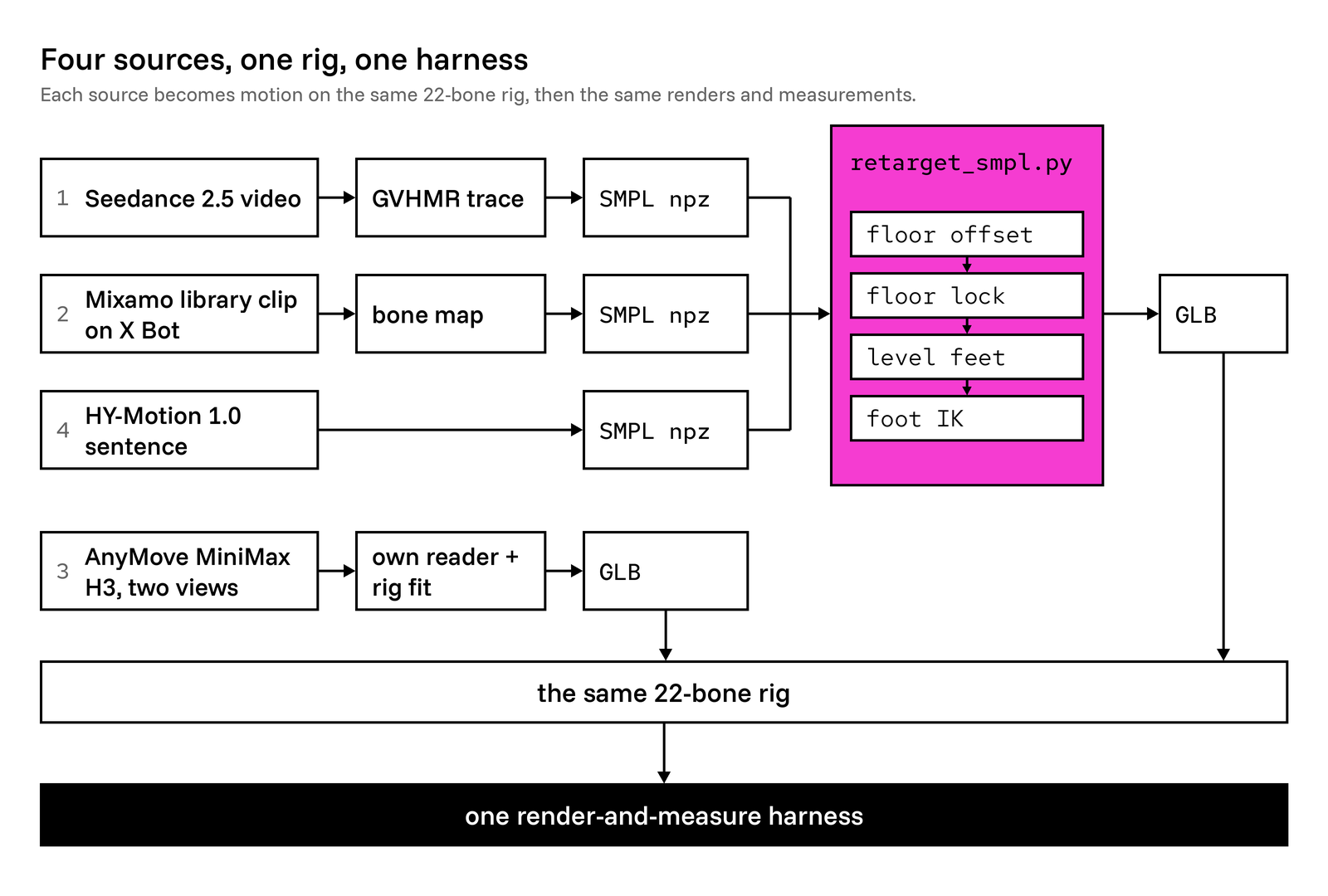
Three sources write the same SMPL-layout file and go through one retargeter. AnyMove fits its own 22-bone rig. Everything lands on the same 22 bones.
1. Find the joints automatically
Find the skeleton from renders of the mesh instead of placing joints by hand, so the same tool works on the next character.
auto_joints.py finds the skeleton in any T- or A-pose humanoid mesh:
Render the mesh from the front and the side with orthographic cameras, so a pixel is a fixed number of millimeters.
Run MediaPipe Pose on both renders.
Take x from the front view, y from the side view, and z from both.
Add anatomical offsets, scaled to torso length, for the joints a pose model doesn't report.
Center each limb joint inside its limb's cross-section.
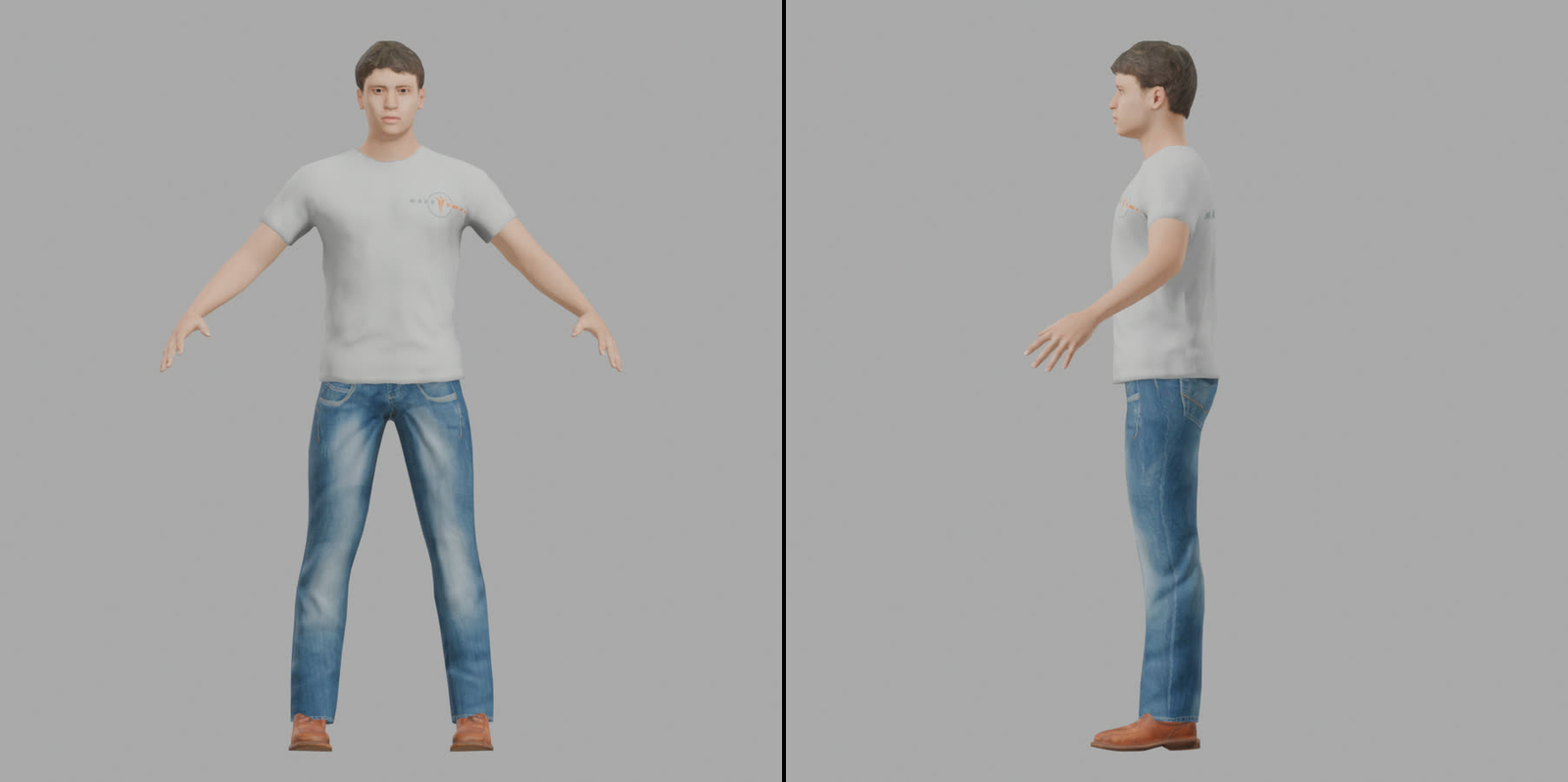
Front, orthographic: MediaPipe reads x and z here. Side, orthographic: y and z.
What you should see: against MakeHuman's own anatomical joints, the 27 joints came out with a mean error of 3.9 cm before calibration and 2.1 cm after. The calibration used this same body, so expect something nearer 3.9 cm on a new character. After calibration, the worst joints are the balls of the feet (4.4 cm), the elbows (4.0 cm) and the toe tips (3.8 cm). The hips and neck land within 0.1 cm.
2. Build a 22-bone SMPL rig
Build the rig with the same bone names and tree as SMPL, the parametric body model that most human-motion tools speak. Then GVHMR, HY-Motion and a converted Mixamo clip can all drive it without a custom mapping per source.
build_rig.py makes 22 bones in SMPL's layout, in this order: pelvis, left_hip, right_hip, spine1, left_knee, right_knee, spine2, left_ankle, right_ankle, spine3, left_foot, right_foot, neck, left_collar, right_collar, head, left_shoulder, right_shoulder, left_elbow, right_elbow, left_wrist and right_wrist.
The skin weights come from Blender's bone heat on a closed body mesh. They're transferred to the clothes, smoothed, and capped at 4 bones per vertex.
What you should see: a bend test with no tearing.
3. Retarget in world space, not bone by bone
GVHMR, HY-Motion and our Mixamo converter all write the same file: SMPL axis-angle rotations, a root path, and 22 joint positions. One script, retarget_smpl.py, puts that on the rig.
Copying local rotations bone by bone doesn't work. The source skeleton stands in a T-pose with its own bone directions, and ours stands in an A-pose. So the retargeter works in world space: for every frame it computes where each source bone points in the world, then turns our bone to point the same way.
For every frame and every joint:
The source's world rotation, by forward kinematics: the parent joint's world rotation times the Rodrigues rotation of the joint's own axis-angle.
From SMPL's axes to Blender's. SMPL is y up and faces +z; Blender is z up and faces −y. Each world rotation G becomes C · G · Cᵀ, where C is the axis swap with rows (1, 0, 0), (0, 0, −1) and (0, 1, 0).
A rest correction, once per bone. K_b is the shortest arc from our bone's rest direction to the source bone's.
Our bone's world rotation is the converted source rotation, times K_b, times L_b, our bone's rest matrix in armature space.
The root path. The pelvis moves as far as the source's pelvis has moved since the first frame, scaled by our leg length over the source's.
Blender keys the pose-bone basis, so the core loop runs forward kinematics down our rig: every bone takes its source joint's world rotation, the pelvis carries the scaled root path, every other bone's head rides on its posed parent, and each bone's world matrix is converted back into its parent's space.
Three details that matter:
The first frame is turned so the character faces −y.
Quaternions are kept on one hemisphere from frame to frame, so the interpolation never takes the long way round.
The feet and the head keep the identity rest correction, because SMPL's foot joints have no meaningful bone direction.
After the copy, four passes clean up contact with the floor:
Floor offset. Shift the body so the clip's lowest foot point (its 3rd percentile, so one bad frame can't decide) sits where it sits in the rest pose.
Floor lock. Find frames where the lowest foot point is within 3 cm of its local minimum over ±0.75 s and moving under 0.25 m/s vertically. Pull the body back to the floor there and blend linearly in between, so real flight arcs survive.
Level the feet. See step 8.
Foot IK. See steps 9 and 10.
The script runs on any motion file in Patch's Cloud Blender, with no window, and it can switch the floor lock and the foot IK off, so you can compare a clip with and without them.
What you should see: on every clip from every SMPL-layout source, the retargeted bone directions match the source to within 1.6°. The feet are the one deliberate exception: foot leveling turns them on purpose. Floor lock fixed GVHMR's jump, which landed 10 cm high, and its dance, which started 17 cm in the air. Mixamo and HY-Motion needed 3 cm of correction at most.
prompt for your agent
Use Patch's CLI, pch (curl -fsSL https://patch.gg/install.sh | sh if it's missing). Start a session on Patch's Cloud Blender with pch blender session start, upload my humanoid character (T-pose or A-pose) with pch blender files upload, and use pch blender run for the bpy code:
1. Find its joints: render it front and side with orthographic cameras, run MediaPipe Pose on both, take x from the front, y from the side and z from both, add offsets scaled to torso length for the joints the pose model doesn't report, and center each limb joint in its limb's cross-section.
2. Build a 22-bone rig with SMPL's bone names and tree. Weight it with bone heat on a closed body mesh, transfer the weights to the clothes, smooth them and cap them at 4 bones per vertex.
3. Write a retargeter for SMPL-layout motion (axis-angle rotations, a root path and 22 joint positions) that works in world space: SMPL's y-up axes turned to Blender's z-up, a shortest-arc rest correction per bone (none for the feet and head), the root path scaled by leg length, the first frame facing −y and quaternions kept on one hemisphere. Then shift the clip so its lowest foot point (3rd percentile) sits at its rest height, and lock it to the floor wherever that point is within 3 cm of its minimum over ±0.75 s and moving under 0.25 m/s.
Show me the bend test and a retargeted clip with pch blender look, save the .blend with pch blender save, and stop the session when you're done.
4. Source one: film it with Seedance, trace it with GVHMR
Render the character, hand the still to a video model with one sentence, and trace a 3D skeleton out of whatever it films. This is the way to get a move nobody has captured.
The start frame is the character rendered in a plain studio:
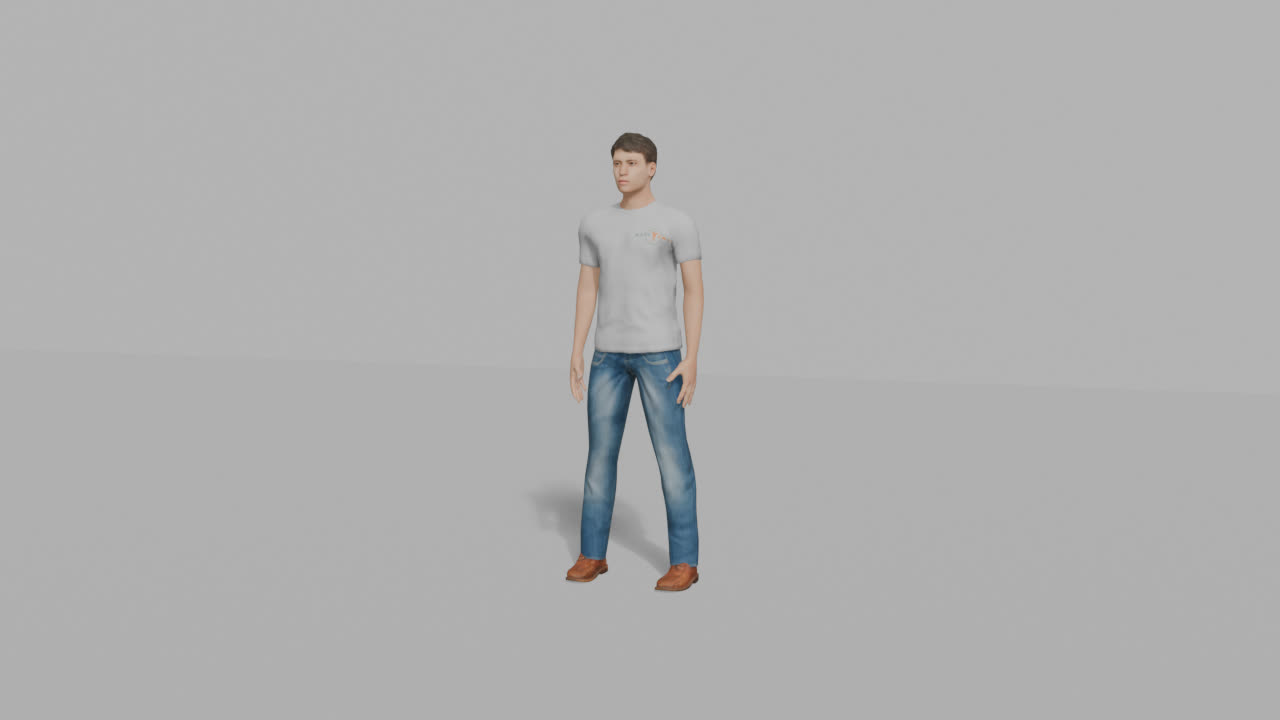
The still every Seedance 2.5 clip starts from.
Each action got one prompt plus a shared style line, sent to Seedance 2.5 through fal at 720p for 5 seconds:
Walk: "The man walks forward a few relaxed steps diagonally towards the camera, arms swinging naturally, then stops and stands still."
Jump: "The man bends his knees, swings his arms and jumps straight up, lands on the same spot, and stands still."
Punch: "The man raises his fists into a boxing stance, throws a quick right jab and then a left hook, then lowers his hands."
Wave: "The man raises his right hand above his shoulder and waves hello for a few seconds, then lowers his arm and stands still."
Dance: "The man does a happy, energetic dance on the spot, bouncing to a beat and swinging his arms and hips."
The shared style line starts: "static locked-off camera, the camera never moves, no cuts, no zoom. the same man from the image".
All 5 clips came back usable: locked camera, full body in frame, same man, same clothes.
GVHMR (gravity-view human motion recovery) then runs on Modal on an A10G, about 78 seconds per clip, in static-camera mode. It estimates the SMPL body in camera space and a gravity-aligned world trajectory. Its mesh overlay should sit right on the person: that's the first sanity check.
Left: the Seedance 2.5 video. Middle: GVHMR's SMPL body over the same frames. Right: on our rig, retargeted, floor-locked, feet pinned.
The world view is what you retarget. Its vertical drift is why the floor lock exists:
GVHMR, walk: camera view and world view.
Cost: about $2.37 for the video and $0.03 for the trace.
The catch is the license. GVHMR and the SMPL-X body model are non-commercial, and for this internal test the weights came from unofficial mirrors. Production needs those licenses or a different tracer. Meta's SAM 3D Body, whose body model is Apache-2.0, is the untested candidate.
prompt for your agent
Use Patch's CLI, pch (curl -fsSL https://patch.gg/install.sh | sh if it's missing). In a session on Patch's Cloud Blender (pch blender session start, then pch blender run), render my rigged character in a plain studio as a start frame. Send it to Seedance 2.5 through fal, with my fal key, at 720p for 5 seconds, with one sentence for the move plus a style line that starts "static locked-off camera, the camera never moves, no cuts, no zoom. the same man from the image". Then start a session on Patch's Cloud Blender with a GPU (pch blender session start --gpu l40s), upload the clip with pch blender files upload, install GVHMR there with pch blender exec and trace the clip in static-camera mode. Check that its mesh overlay sits on the person, and retarget its world-space SMPL motion onto my rig with the retargeter from step 3. GVHMR and SMPL-X are for non-commercial use only, so tell me before using them for anything I ship. Tell me what the video and the trace cost, and stop the sessions when you're done.
5. Source two: take a clip from the Mixamo library
Use Mixamo as a library of stock moves, not as the rigging step.
We tried Mixamo's auto-rigger first, since that's what most people use it for. It refused our character six times on 10 Nov 2026:
Attempt
What we uploaded
Result
1
Textured FBX
failed
2
Without eyebrow and eyelash cards
failed
3
Scale baked 1:1, no eye parts
failed
4
Closed full body
failed
5
Closed body, "no fingers" skeleton
failed
6
Plain untextured OBJ
failed
Each attempt ended with the same message: "ERROR occured on rig: Unknown error while generating motion".
Every attempt failed the same way, after Mixamo's own upload and marker-placement jobs had succeeded. That points at the service, not the mesh. Adobe stopped developing Mixamo years ago, and the rigger broke for many users in June 2025.
The library still works. We took five studio mocap clips on X Bot: Walking, Standing Jump, Punch Combo, Waving and Silly Dancing. mixamo_to_smpl_npz.py maps Mixamo's bones one to one onto the SMPL layout, and the shared retargeter does the rest. Walking and Waving are short loops (1.0 s and 0.6 s), tiled to 5 seconds.
Mixamo, Standing Jump: implied gravity 11.2 m/s², the closest to real.
What you should see: the most natural-looking motion in the test, with crisp impacts and a jump close to real gravity. It's free with an Adobe ID, and royalty-free.
AnyMove is Patch's open-source capture, made by @rehan_shei, with the two-camera method by @CanItCode. It films one video with two camera views, trains a reader on the character, and fits a rig to both views at once. It was built for creatures that no pretrained tracker understands. We ran it on our human for one move, the jump, to see how it compares when a pretrained tracker does exist.
Rig and paint. The rig comes from the auto-skeleton in step 1. The limbs are painted in flat colors so the reader can tell left from right.
Dataset. 2,200 random poses inside the joint limits, rendered from two views with Blender Cycles on Metal in 20.6 minutes.
Reader. A DINOv2-based keypoint reader, trained for 20 epochs on one NVIDIA H100 on Modal in 6 minutes. Held-out error: 2.68 px front and 2.77 px side, about 0.6% of body height.
Filming. MiniMax H3 Max on fal films the painted character in a split frame, front and side, 1344x768 at 24 fps. Both seeds passed AnyMove's own gates, with no rerolls.
Solve. The rig is fitted to both views per frame on the CPU, 48 seconds a take, then keyed and rendered.
Left: the MiniMax H3 Max take, front and side in one frame, limbs painted for the reader. Right: the joints the reader found and the solved rig.
What you should see: the exam (a known random motion, rendered and read back) scored 2.08 cm mean 3D joint error, median 0.66 cm, p95 7.2 cm. The worst joints were all on the left foot, the far leg, whose depth only the side camera sees: ankle 9.4 cm, ball 11.6 cm, toe tip 13.5 cm. A jump with the feet side by side doesn't suffer from that. Walks, kicks and crossed legs would.
All in, about $1.21 for the rig, the reader and two takes, and 41 minutes from clone to a trained reader.
prompt for your agent
Use Patch's CLI, pch (curl -fsSL https://patch.gg/install.sh | sh if it's missing). Clone AnyMove with pch clone patch/anymove and follow its README to capture one move for my character: rig it, paint the limbs in flat colors, render 2,200 random poses inside the joint limits from two views, train its keypoint reader for 20 epochs on an NVIDIA GPU, film a split-frame front and side take with MiniMax H3 Max on fal, and solve the rig against both views. Run the Blender steps in a session on Patch's Cloud Blender (pch blender session start, pch blender run, and pch blender files upload and download), and show me the solved take with pch blender look. Tell me the reader's held-out error and what each part cost, and stop the session when you're done.
7. Source four: type it with HY-Motion
Skip video entirely. HY-Motion 1.0, Tencent's 1-billion-parameter text-to-motion model, turns a sentence into a skeleton motion. It runs on a Modal L40S at about 3 seconds per clip, well under a cent each, and writes SMPL-layout motion directly, so it drops straight into the retargeter.
Every clip was 5 seconds at 30 fps, from these prompts:
Move
Prompt
Seed
Walk
"a person walks forward at a normal pace"
1
Jump
"a person crouches and jumps straight up, then lands"
2
Punch
"a person throws a right jab and a left hook in a boxing stance"
2
Wave
"a person waves hello with the right hand"
1
Dance
"a person does a happy dance, bouncing and swinging the arms"
1
Seeds matter. With seed 1, walk, wave and dance were right. The jump went forward instead of straight up, and the punch had no left hook. Seed 2 got both right. At 3 seconds a try, a reroll is cheap.
What you should see: smooth motion on most moves (the wave's jitter is 0.59 mm, among the smoothest). Its walk shuffles: the stance feet glide and the swing foot passes 1 to 2 cm over the floor. Foot IK reduces the gliding and the sinking (slide 9.42 to 4.98 cm/s, deepest shoe 8.32 to 2.64 cm under), but the low swing is in the source and stays.
The license is the real constraint. It doesn't cover the EU, the UK or South Korea, products over 1M monthly users need a deal with Tencent, and outputs can't be used to train other models.
8. Level the feet
Bodies retarget well. Feet don't. A world-space retarget copies bone directions exactly, and that is the problem: our shin is a different length from the source's, our ankle sits at a different height, and our foot is a different shape. Copy the angles faithfully and the foot ends up wherever those differences put it, a few centimeters off and drifting as the knee bends.
Start by measuring the sole's pitch, heel to ball, on frames where the foot is low and slow. If retargeting were perfect, it would be about zero. It wasn't, for any source, and the sign depends on where the motion came from:
Mixamo's rest foot is about 10° steeper than ours, so its planted feet point toes-down.
The SMPL sources (GVHMR and HY-Motion) plant toes-up on 9 of 10 clips, by 4 to 16°, which drives the heel through the floor. That was most of the sinking. The exception, HY-Motion's dance, is a few degrees toes-down.
The fix is a per-clip, per-foot constant: take the median pitch over the slow, low frames (capped at ±25°) and rotate foot and toes by it about the foot's own lateral axis. A constant, because the error is a rest-pose mismatch, and a per-frame correction would flatten real heel strikes and toe-offs.
9. Pin the planted feet
Detect when a foot is planted and hold it still. Steps 9 and 10 together are the foot IK pass.
Detect contacts on the sole, not the joints. The first version detected contacts from joint heights and made slide worse. The ankle joint is 9.6 cm up and rises during every heel-to-toe roll, so a foot that is properly planted looks like it's lifting. So each foot carries three points fixed to it: a heel point on the floor under the ankle, a ball point on the floor under the ball joint, and the toe tip.
A frame is a contact when the lower of heel and ball is within 4 cm of the floor and moving under 0.5 m/s.
Gaps of 1 or 2 frames are closed. Contacts shorter than max(3 frames, 0.1 s) are dropped.
A contact whose pinned point would have to travel more than 50 cm is treated as a deliberate slide and left alone.
Inside a contact, the pivot is whichever of heel and ball is lower, with 1 cm of hysteresis so a flat foot doesn't flicker between them. Heel strike rolls about the heel, flat foot holds, toe-off rolls about the ball.
Pin at the contact's average spot, not where it landed. Subtracting the mean correction halves the worst offset and spreads it over the contact, so nothing jumps at landing. Use one vertical offset per contact: the sole's 20th-percentile low point is lifted to the floor, and the same offset holds for the whole contact. Between contacts, the correction eases from one contact's value to the next with a smoothstep, u²(3 − 2u).
Per contact, that comes to a short loop: each frame moves the correction against the pivot's sideways motion, so the pivot holds still, and then the contact's corrections are shifted by their mean so it pins at the average spot. A last pass lifts anything still under the floor.
10. Reach the pin with a pelvis dip and two-bone IK
The pinned foot now needs a leg that reaches it.
Dip the pelvis instead of stretching the leg. A pinned ankle can end up further from the hip than the leg is long. For each leg, solve for the smallest vertical drop x that brings the pinned ankle within reach r = 0.995 (l₁ + l₂), from |D + x·ẑ|² = r², taking the smaller non-negative root. Take the larger of the two legs' needs, then max-filter and mean-filter it over ±0.1 s so the body never bobs.
Solve each leg in closed form. With thigh l₁ = 46.9 cm and shin l₂ = 40.9 cm, hip H, pinned ankle P and the old knee K:
The reach d is the distance from H to P, capped at 0.9995 (l₁ + l₂).
The new knee K′ sits a = (l₁² − l₂² + d²) / 2d along the line from H to P, and h = √(l₁² − a²) out from it, on the old knee's side of the line. For a straight leg, it goes out toward the pelvis's forward.
The thigh turns by the shortest arc from K to K′, and the shin by the shortest arc from where it now points to P.
The foot and toes keep their world rotation.
The knee stays in the plane the source knee was bending in, so the pose keeps its character, and the leveled sole stays level.
HY-Motion walk. Left: leveling and pinning off, slide 9.42 cm/s, shoe up to 8.32 cm under the floor. Right: with them, 4.98 cm/s and up to 2.64 cm under.
A camera 10 cm off the floor over a 10 cm checker. A shoe that sinks is cut off by the floor; a shoe that slides moves against the squares.
What you should see: across all 15 clips, the pelvis dips 2 cm at most and 0 frames are left overstretched. Slide fell on all 15 clips, to 2.3 cm/s or less on every jump and wave, and by half or more on 11 of 15. Jitter moved by 0.3 mm at most and peak knee speed is unchanged, so there are no knee pops.
Clip
Foot slide, cm/s
Shoe under floor, cm
Frames > 5 mm under
Seedance + GVHMR, walk
5.54 → 2.28
4.45 → 1.13
93% → 3%
Seedance + GVHMR, jump
6.67 → 2.16
5.54 → 1.06
77% → 26%
Seedance + GVHMR, punch
11.5 → 9.85
5.37 → 2.05
91% → 43%
Seedance + GVHMR, wave
0.58 → 0.38
2.29 → 0.7
100% → 55%
Seedance + GVHMR, dance
22.04 → 10.6
2.68 → 1.32
36% → 20%
Mixamo, walk
9.93 → 7.86
1.06 → 0.39
71% → 0%
Mixamo, jump
6.81 → 2.29
0.95 → 0.88
19% → 14%
Mixamo, punch
5.54 → 0.74
1.16 → 0.82
76% → 50%
Mixamo, wave
1.83 → 0.03
0.3 → 0.32
0% → 0%
Mixamo, dance
8.71 → 3.63
1.36 → 1.87
11% → 9%
HY-Motion, walk
9.42 → 4.98
8.32 → 2.64
100% → 16%
HY-Motion, jump
4.88 → 0.86
3.6 → 0.56
85% → 1%
HY-Motion, punch
5.58 → 1.69
2.91 → 0.39
100% → 0%
HY-Motion, wave
2.04 → 0.47
4.23 → 0.3
100% → 0%
HY-Motion, dance
7.45 → 3.57
1.83 → 0.69
26% → 3%
Sunk feet were the bigger hidden problem. Before, 8 of the 10 SMPL-sourced clips had the shoe 2.3 to 8.3 cm under the floor in 77 to 100% of frames. Leveling plus pinning put them on top. Two Mixamo clips read slightly deeper after: dance 1.4 → 1.9 cm and wave 0.30 → 0.32 cm.
What's left is mostly real. Walks keep 2 to 8 cm/s because heel-to-toe roll moves the ankle joint while the sole stays put, and the metric tracks joints. Seedance's punch (9.9) has low shuffle steps that never settle long enough to count as contacts. Seedance's dance (10.6) is about two thirds roll inside contacts and a third quick steps.
11. Measure every clip the same way
Open every GLB in Patch's Cloud Blender, render it from the same camera, and read the same three numbers off the evaluated skeleton and mesh. Without this, "looks better" is all you have.
Foot slide: how far a foot travels while it should be still, in cm per planted second. Each foot gives two points, the ankle and the ball. A point is planted on a frame when it's within 2 cm of its own 5th-percentile height for two frames in a row and moving under 1 m/s. The 1 m/s cap stops a swing foot that passes low at walking speed from counting as a slide.
Jitter: how far the main joints sit off a Savitzky-Golay fit (a cubic over a 9-frame window). Read it with care: it also counts real sharpness. Mixamo's studio mocap scores "jittery" because it has true landing impacts and a fast 2 Hz wave, while GVHMR and HY-Motion come out pre-smoothed.
Penetration: how deep the deformed shoe mesh goes below the floor on its worst frame, plus the share of frames more than 5 mm under. The rest pose itself reads 0.26 cm, from the sole's rounded edge.
Put as sums: slide is the sideways distance planted points travel, divided by the planted time in seconds. Jitter is the mean distance of the main joints from their fit. Penetration is how far the lowest shoe vertex goes under the floor on the worst frame.
One script, compare/run_all.sh, renders and measures everything, and a debug switch dumps the contacts it found.
Every clip, with foot IK on (AnyMove only ran the jump):
Foot slide, cm/s
Seedance + GVHMR
Mixamo
AnyMove
HY-Motion
Walk
2.28
7.86
not run
4.98
Jump
2.16
2.29
1.48
0.86
Punch
9.85
0.74
not run
1.69
Wave
0.38
0.03
not run
0.47
Dance
10.6
3.63
not run
3.57
Jitter, mm
Seedance + GVHMR
Mixamo
AnyMove
HY-Motion
Walk
2.57
4.48
not run
1.85
Jump
2.45
7.18
1.59
2.21
Punch
6.44
5.01
not run
1.15
Wave
0.56
4.6
not run
0.59
Dance
6.33
3.64
not run
7.3
Shoe penetration, cm
Seedance + GVHMR
Mixamo
AnyMove
HY-Motion
Walk
1.13
0.39
not run
2.64
Jump
1.06
0.88
0.97
0.56
Punch
2.05
0.82
not run
0.39
Wave
0.7
0.32
not run
0.3
Dance
1.32
1.87
not run
0.69
Lower is better on all three. The lowest value in each row is in bold.
prompt for your agent
Use Patch's CLI, pch (curl -fsSL https://patch.gg/install.sh | sh if it's missing). In a session on Patch's Cloud Blender (pch blender session start, then pch blender run), add a foot pass to my retargeter:
1. Level the feet: per clip and per foot, take the median sole pitch (heel to ball) over frames where the foot is low and slow, cap it at ±25°, and rotate foot and toes by it about the foot's lateral axis.
2. Pin planted feet using sole points (a heel point and a ball point on the floor, plus the toe tip): a contact is within 4 cm of the floor and under 0.5 m/s. Close gaps of 1 or 2 frames, drop contacts shorter than max(3 frames, 0.1 s), and leave a contact alone if its pin would travel over 50 cm. Pivot on the lower of heel and ball with 1 cm of hysteresis, pin at the contact's average spot, lift the sole's 20th-percentile low point to the floor once per contact, and smoothstep between contacts.
3. Reach each pin with a pelvis dip (the smallest drop that brings the ankle within 0.995 of the leg's length, max-filtered and mean-filtered over ±0.1 s) and two-bone IK in closed form that keeps the knee in its plane and the foot's world rotation.
Then measure every clip before and after, as in step 11 (foot slide, jitter and shoe penetration), render each from the same camera with pch blender look, and give me a table. Stop the session when you're done.
12. Check your jumps for floating
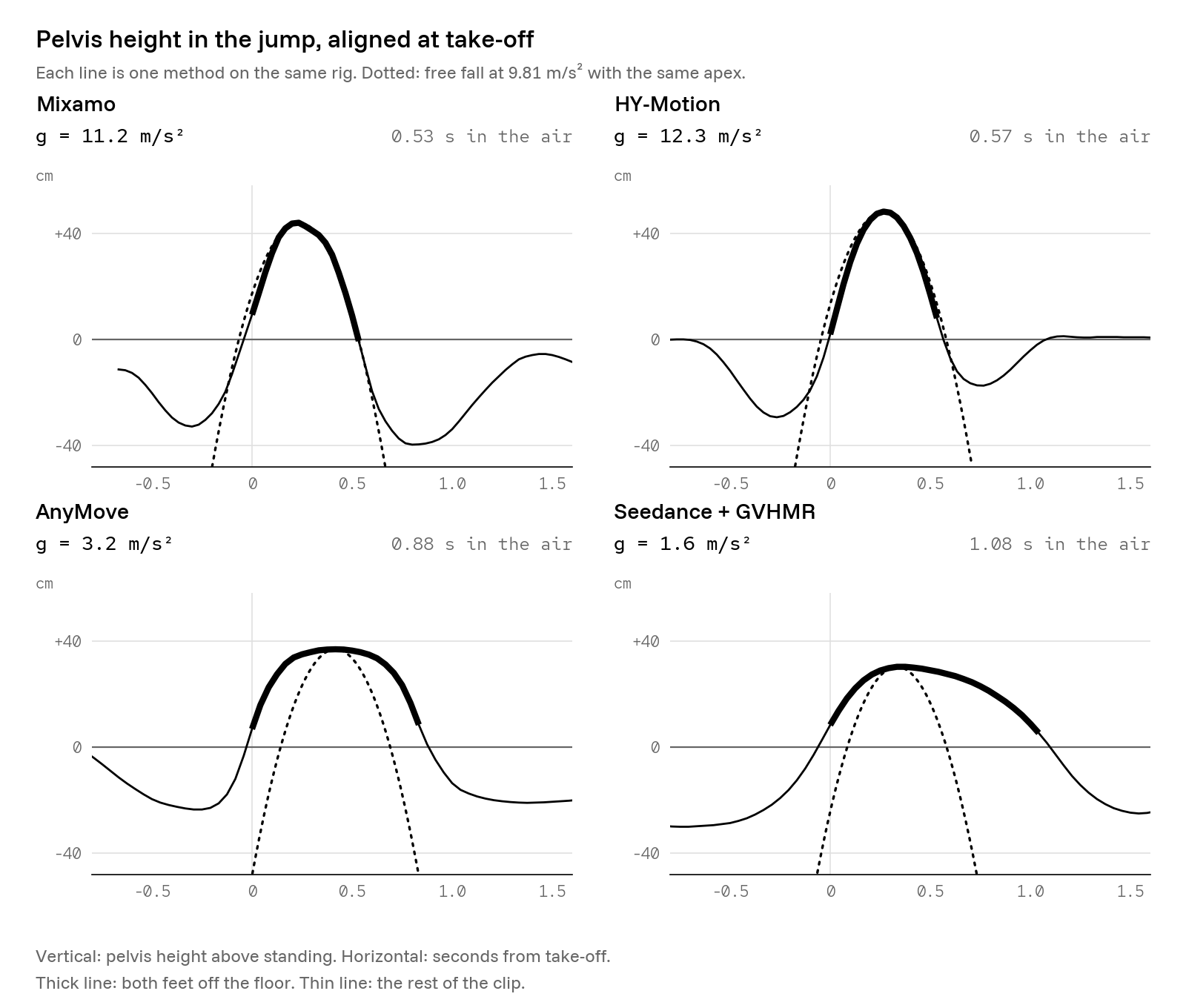
How long a body stays in the air for how high it goes is fixed by gravity, which makes the jump a free physics test. Fit a parabola to the pelvis over the flight (every foot joint more than 3 cm above its standing height); the implied gravity is g = −2a.
Pelvis height through each jump, aligned at take-off, with the arc real gravity would make from the same apex.
Method
Implied gravity
Time in the air
Mixamo
11.2 m/s²
0.53 s
HY-Motion
12.3 m/s²
0.57 s
AnyMove (MiniMax H3 video)
3.2 m/s²
0.88 s
Seedance + GVHMR
1.6 m/s²
1.08 s
Mixamo and HY-Motion land close to the real 9.81 m/s², given how short the flights are. The two video-sourced jumps don't: the Seedance take implies 1.6 m/s² with 1.08 s in the air for about 25 cm of foot lift. A real person who lifts their feet 25 cm is airborne for about 0.45 s.
Neither capture method is at fault. AnyMove's checks test whether the two camera views agree, and GVHMR traces what it sees. Both faithfully copy a video model that doesn't respect gravity. Anything sourced from AI video needs its flight phases retimed: find the flight window, keep the take-off and landing poses, and resample the frames between them by √(g_video / 9.81).
What it cost
Method
Per move
Wall clock
GPU
License
Seedance + GVHMR
about $2.40
about 3 min + 78 s
A10G on Modal
Seedance via fal: commercial use allowed. GVHMR and SMPL-X: non-commercial only.
Mixamo
$0
seconds
none
Royalty-free with an Adobe ID; library clips only
AnyMove
about $0.26 + GPU
about 8 min, after 41 min of setup
NVIDIA only: H100 to train
Apache-2.0; MiniMax H3 community license for the clips
HY-Motion
under $0.01
about 3 s
L40S on Modal
Tencent license: not in the EU, UK or South Korea; over 1M MAU needs a deal; no training on outputs
What we spent on 10 Nov 2026:
Item
USD
Seedance 2.5, 5 clips at 720p, via fal
11.85
GVHMR on Modal, setup and 5 traces
0.40
HY-Motion on Modal, including setup
0.26
AnyMove: fal $0.52 + Modal $0.69
1.21
Mixamo
0.00
Total (line items rounded)
13.70
Which method to use
For humans: one shared rig from the auto-skeleton, the SMPL-layout retargeter with floor lock and foot IK, and a mix of sources on top.
Custom moves: Seedance + GVHMR. The best way to get a move nobody has captured. The motion is whatever the video shows, with real weight shifts and timing: the jump's crouch and landing, the boxing guard, the dance. With foot IK, contact is good on most moves (walk 2.3 cm/s, jump 2.2, wave 0.4). Watch fast footwork (punch 9.9, dance 10.6), floaty jumps and, above all, the licenses: swap the tracer before shipping.
Stock moves: Mixamo. The most natural-looking motion we tried, with crisp impacts and near-real gravity, and it retargets cleanly. A fixed library of short loops, and the auto-rigger is unreliable. Use it as a source of stock moves, never as the rigging step.
Drafts, waves, dances: HY-Motion. The fastest and cheapest way to a custom move, and smooth on most moves (its dance is the exception). Expect to reroll a seed now and then. The walk shuffles. Check the license against where you ship.
Creatures: AnyMove. The most accurate read of its own video in our test, 2.1 cm on a known motion. On a human it adds about 41 minutes of setup and needs an NVIDIA GPU, while a pretrained tracker does the same job with no training. Keep it for what it's built for: dragons, spiders and quadrupeds, where no pretrained tracker exists.
What went wrong
Mixamo's auto-rigger failed 6 times out of 6 on six versions of the mesh, after its own upload and marker jobs succeeded. Uploading from our browser pane also needed a workaround: it can't open a local file picker, and Mixamo's content security policy blocks fetches from other origins. So a localhost tab sent the FBX over a WebRTC data channel, which the policy doesn't govern, and the Mixamo tab rebuilt it as a File on its own file input.
Contacts from joint heights made slide worse. The ankle rises during a normal heel-to-toe roll. Detecting contacts on sole points fixed it.
Snapping every frame to the floor made the swing skim. Version 3 did that, the easing carried it into the swing, and Mixamo's walk read 60 cm/s of slide. One vertical offset per contact fixed it.
Letting the leg overstretch happened on up to 150 frames of a standing clip and made the foot slip off its pin. The pelvis dip fixed it.
Two measurement bugs. The old slide metric counted low swing feet at walking speed (HY-Motion's walk read 23.1 instead of 9.4). The old penetration metric read bone points, and Blender's glTF importer invents a toe-bone tail that sits 2.3 cm under the sole even at rest. Every "before" number above was re-measured with the fixes.
Next
Pick a commercially licensable tracer for the AI video method and rerun the five moves.
Measure slide at the sole instead of the joints, so heel-to-toe roll stops counting.
Tune contact detection for fast footwork.
Retime flight phases on video-sourced jumps automatically.
Try Mixamo's auto-rigger again on another day.
Try it
AnyMove on GitHub, Patch's open-source capture for characters that pretrained trackers don't understand. It's on Patch too: pch clone patch/anymove.
3D anime hair from one image: hair cards from one drawing, fitted to a rigged character and swinging with spring bones.
Built and measured by @Christos_antono. AnyMove by @rehan_shei, two-camera method by @CanItCode.
Character: MakeHuman / MPFB2, CC0. Rig, retargeter, harness and renders: ours. Tools and models: Blender 5.2 on Patch's Cloud Blender, NumPy, ffmpeg, MediaPipe Pose, Seedance 2.5 (via fal), GVHMR (on Modal), SMPL-X, Mixamo (Adobe, royalty-free), HY-Motion 1.0 (Tencent Hunyuan community license), MiniMax H3 Max (via fal), DINOv2. GVHMR and SMPL-X weights came from unofficial mirrors for an internal test only, under non-commercial licenses. Every motion metric here was measured by the project's scripts on 10 Nov 2026.