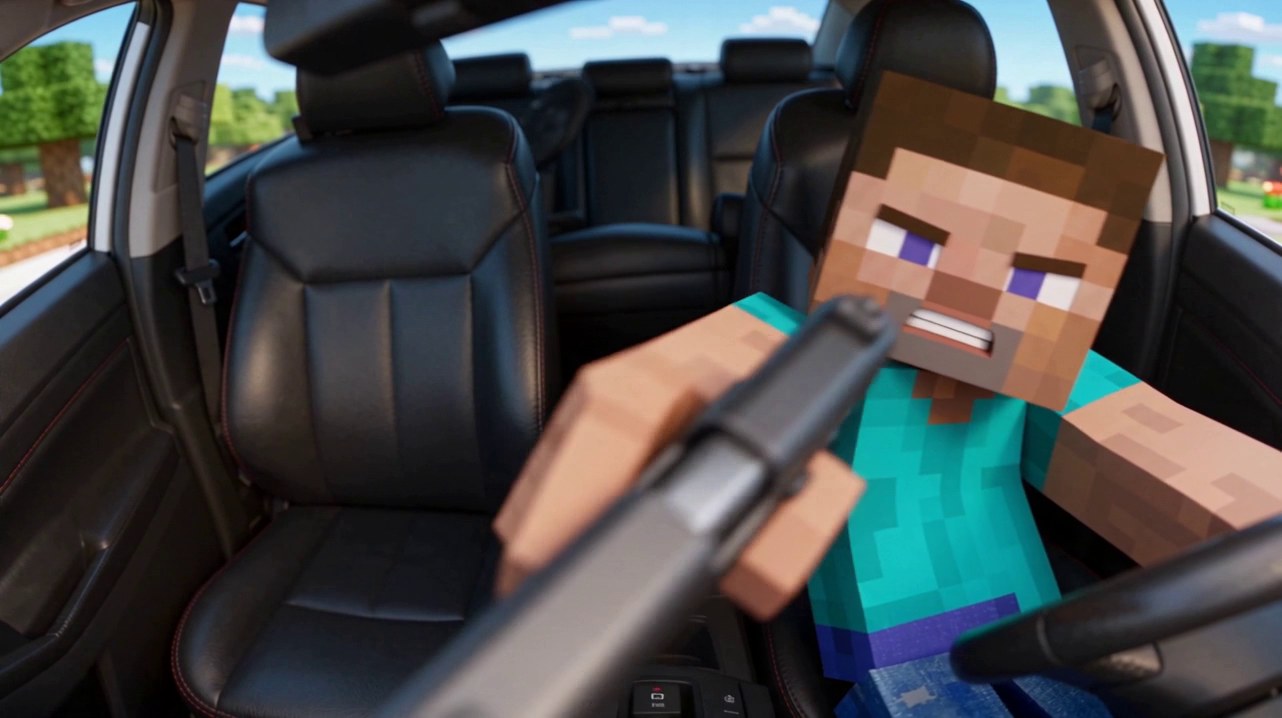
How to replace a character in a video with AI, from two real Higgsfield Genjutsu runs: the prompts, costs and edit fixes, Skyrim cast to Minecraft Steve.
To replace a character in a video with AI, make clean reference images of the new character, cut the source into clips of at least 4 seconds, and send each clip with its references to a model that keeps the motion and swaps the person. We used Higgsfield Genjutsu for two reels. Object Swap put three Skyrim characters into a live-action reel for $12.76 in logged generation costs. Motion Transfer turned a cartoon girl in a car into Minecraft Steve for $20.90, including one run we threw away. Each completed Genjutsu call took 5 to 11 minutes.
The Skyrim swap: the source reel's footage and camera, with Skyrim's cast in it
Both reels were made by Patch on 2026-10-28, the day @rehan_shei asked for them. This article follows them in the order they were built: breaking the source into beats, the reference images, cutting clips Genjutsu accepts, the prompts and API calls, then the edit that puts the clips back on the source's timing and hides the seams. The edit is done in ffmpeg. Where a command is ours rather than the project's, the article says so.
What you need
A source clip. One clear subject per shot works best. Ours were a 15.1 s phone reel by @yanayudina_neuro (Harry Potter characters at a Russian gas station, 4.9M views on Instagram) and a 14.1 s cartoon by @ai.tezu (Masha from "Masha and the Bear" with a pistol in an SUV, 1.55M views).
An image model for character references. We used Google's Nano Banana 2.1 (google/nano-banana-2.1 on fal), at $0.236 per call of four images.
Higgsfield Genjutsu, through its web app or its API. The API takes a source video of at least 4 seconds (longer than 30 s is trimmed to 30 s), 1 to 8 reference images, an optional prompt, and an output resolution of 480p, 720p or 1080p. The web app takes up to 30 reference images (, ). Object Swap also needs a source video with at least 409,600 pixels per frame (width times height). That rule is about your input file, not the resolution setting.
A video upscaler if you render at 480p. We used Topaz Video Upscale (precision), $0.60 per clip.
ffmpeg for cutting, retiming and joining.
Time and money. Each brief budgeted about 70 minutes, 30 of them for the motion step. Our costs are what our API gateway was billed per call, and they were flat per call: a 4.2 s and an 8.7 s Object Swap clip both cost $3.18 at 480p, and both 7 s Motion Transfer halves cost $6.81 at the default resolution, 720p (we didn't set one). Higgsfield's web app prices in credits instead. A 15 s Object Swap is 48 credits at 480p (about $2.35) and a 15 s Motion Transfer is 105 credits at 720p (about $5.15), at $49 per 1,000 credits (Higgsfield, prices checked November 2, 2026). So you may pay less than we did.
Object Swap or Motion Transfer?
Higgsfield describes the split on its Genjutsu page: Object Swap changes a selected character, outfit, product, location or object and leaves the rest of the shot as filmed, while Motion Transfer keeps the motion, camera and timing and rebuilds the scene from your references. We chose by what each brief wanted kept. We didn't run the other mode on either source, so this is not a test of one against the other.
Skyrim reel
Steve reel
Mode
Object Swap
Motion Transfer
Why
The real gas station is the joke, so the background had to stay as filmed
A 1:1 re-performance with Steve's voxel look
Resolution
480p, then upscaled
Default (720p)
Calls
3 clips, $3.18 each
3 halves (one replaced), $6.81 each
Wait per completed call
312.5 to 668.0 s
433.9 to 506.7 s
1. Break the source into beats
Write down every shot, its start and end, and who is in it before you generate anything. It tells you how many Genjutsu calls you need and where you can cut.
We found the gas-station reel's cuts with PySceneDetect's adaptive detector. If you have it installed, this lists the shots:
It found one cut, at 6.3 s. Inside the first shot there's a second beat: Harry dances until about 3.9 s, then a hand swipes across the lens and the camera lands on Hagrid filming a selfie. So the reel has three characters in three beats:
Time
Source
Swap
0 to 3.9 s
Harry dances on the forecourt
The Dragonborn, horned Iron Helmet
3.9 to 6.3 s
Hand-swipe whip, Hagrid's selfie
Ulfric Stormcloak
6.3 to 15 s
Voldemort steps out of a BMW, grins
Sheogorath
The Masha reel is one fixed camera for 14.1 s, with muzzle flashes on screen at 5.0 s and 7.25 s. One character, so in principle one call.
2. Make reference images of each new character
Make each reference a full-body picture of the character on a plain backdrop, in a neutral pose. The source here is live action, so the prompts ask for a real actor in a costume rather than a game render, to match the footage.
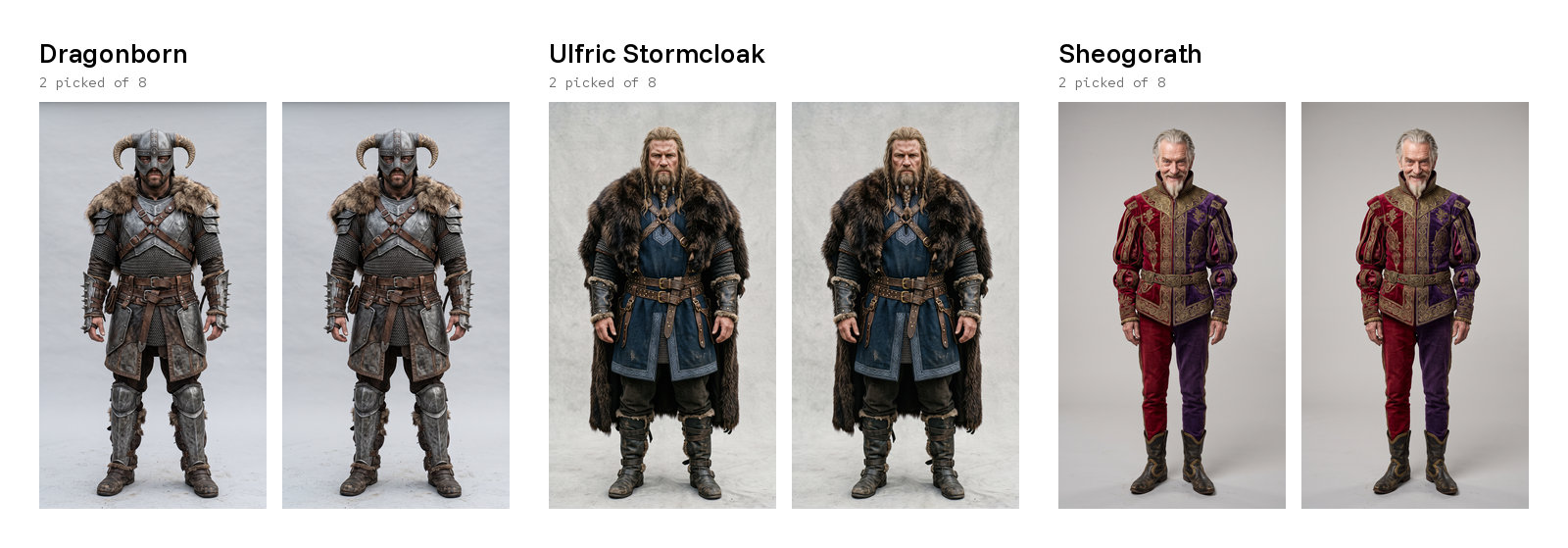
This is the Dragonborn prompt we sent to Nano Banana 2.1, at 9:16, once with seed 1 and once with seed 2:
The Dragonborn from The Elder Scrolls V: Skyrim: the iconic horned Iron Helmet with two curved horns covering the head (face partly visible through the opening), steel-grey iron plate armour over chainmail and leather, fur trim on the shoulders, brown leather belts and boots, Nordic warrior build. Photorealistic full-body character reference photo, live-action film still quality, real human actor in a highly detailed screen-accurate costume, standing in a neutral relaxed pose facing camera, full body head to boots visible, plain light grey studio backdrop, soft even daylight, sharp face detail, 9:16 vertical. No text, no logos, no weapons in hands.
Ulfric and Sheogorath used the same second half, from "Photorealistic full-body character reference photo" to the end. Their first halves:
Ulfric Stormcloak from The Elder Scrolls V: Skyrim: big burly Nord man in his late 40s, long blond-brown hair and full braided beard, stern face, huge dark brown bear-fur cloak over the shoulders, dark blue Stormcloak tunic with leather straps and studded belt, heavy leather boots.
Sheogorath, the Mad God, from The Elder Scrolls V: Skyrim: thin elderly man with a pointed grey goatee and slicked-back grey hair, wild mischievous grin, eyes slightly mad, wearing an ornate split red-and-purple noble jester doublet with gold embroidery, high collar, puffed sleeves, fitted trousers and pointed shoes.
Each call returns four images, so two seeds give eight candidates per character. We picked two per character.
The two references per character that went to Genjutsu
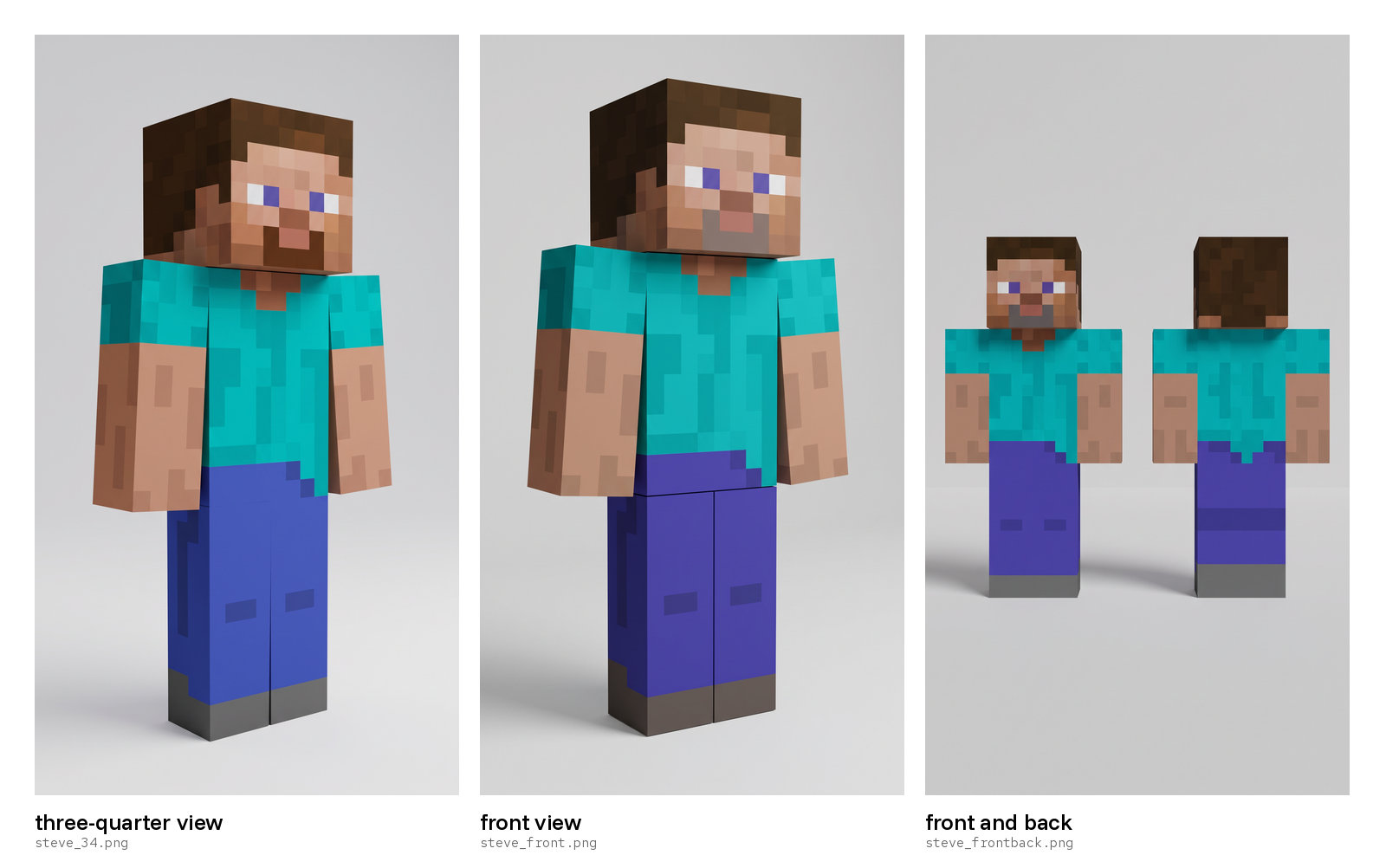
For Steve, the source is a 3D cartoon, so the prompts ask for a clean 3D render. One call for a three-quarter view, one for a front and back sheet:
Minecraft Steve, the classic default Minecraft player character, full body, standing in a neutral A-pose, front three-quarter view. Perfectly blocky cube head and rectangular limbs, pixelated 8x8 face texture with brown hair, blue eyes, short beard stubble, cyan/teal short-sleeve t-shirt, blue jeans, grey shoes. Rendered as a clean 3D character with crisp pixel textures, soft studio light, plain light grey background, whole body in frame head to feet. No text, no logo.
Minecraft Steve character reference sheet: front view and back view side by side, full body, T-pose free natural standing pose. Blocky cube head, pixel-art 8x8 face (brown hair, blue eyes, stubble), cyan t-shirt, blue jeans, grey shoes, square rectangular arms and legs. Clean 3D voxel render with sharp pixel textures, even studio lighting, plain light grey background. No text, no labels.
We used three of the eight: a three-quarter view, a front view and the front and back sheet.
The three Steve references sent with every Motion Transfer call
3. Cut the source into clips Genjutsu accepts
Give each clip one character, and keep every clip at 4 seconds or longer: the API's minimum.
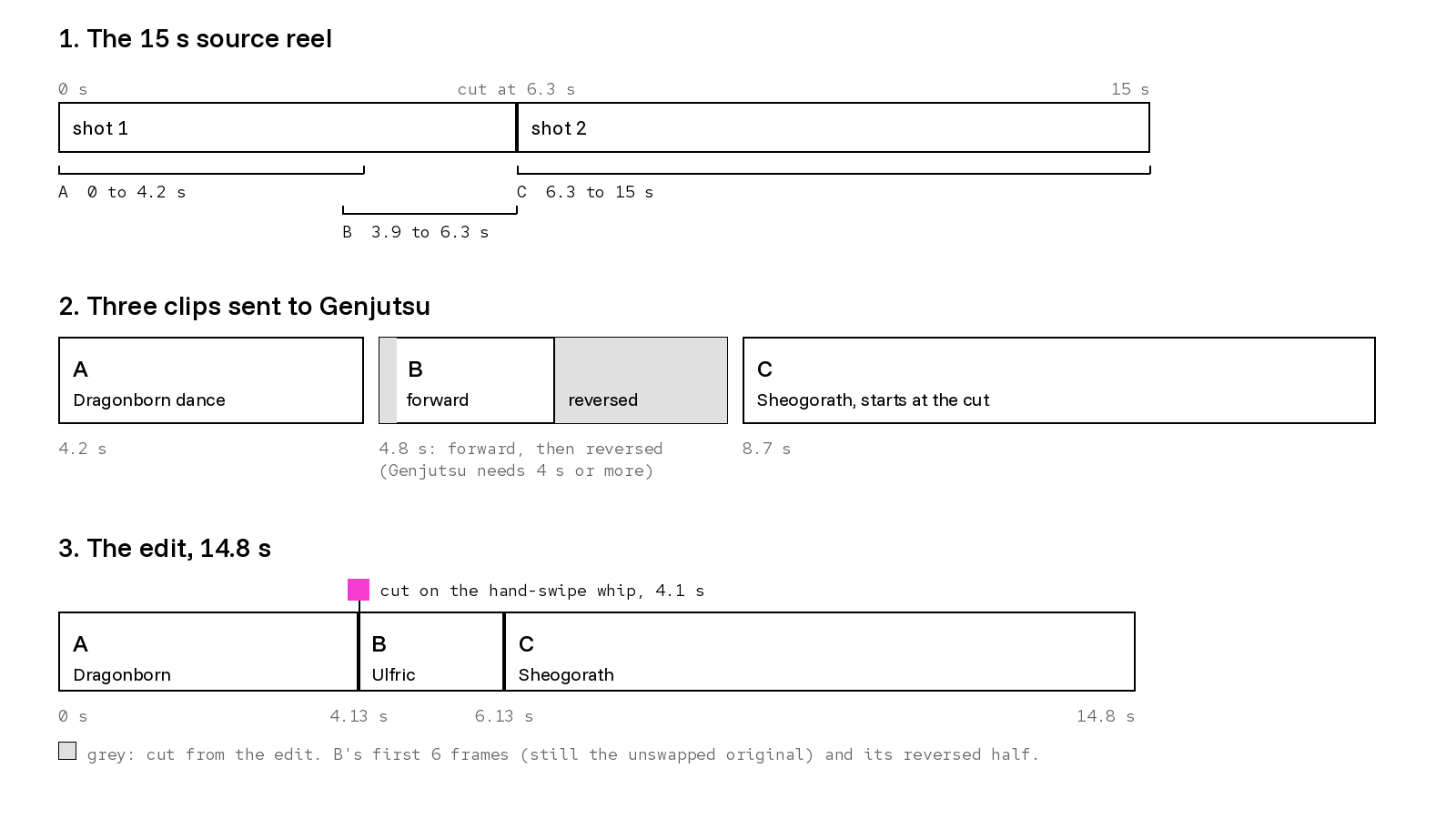
For the gas-station reel that meant three clips:
A, 4.2 s: the dance, from 0 s to just past the start of the whip.
B, 4.8 s: the selfie beat is about 2.4 s, too short. We made it a ping-pong: the clip forwards, then reversed, which doubles it without new footage. Only the forward half is used in the edit.
C, 8.7 s: the second shot, from the cut at 6.3 s to the end.
The project records that B is a ping-pong but not the command it used. This one (ours) makes the same kind of clip from the trimmed selfie beat in.mp4:
The Masha reel is a single shot, but the run on the whole 14 s clip never finished: Higgsfield timed it out after 1,200 s, and no charge was recorded for it. We split the source at 7.0 s into two halves and ran them in parallel.
Clip B is a ping-pong because the selfie beat is shorter than Genjutsu's 4 s minimum
4. Run Object Swap, one clip per character
Send each clip with its two references and a prompt that names who to replace, what they become, and everything that must stay. Run all the clips at once; they don't depend on each other.
The prompts describe the person in the source by what's visible ("the young man in the black school robe"), not by name, and end with a list of what to keep. The three we sent:
Replace the young man in the black school robe with the Dragonborn from Skyrim shown in the reference images: horned Iron Helmet, iron plate armour with fur mantle, leather belts and boots. Keep his exact dance moves, timing, the handheld camera, the gas-station forecourt, sky and lighting unchanged. No robe, no glasses, no wand.
Replace the big long-haired bearded man filming a selfie with Ulfric Stormcloak from Skyrim shown in the reference images: blond hair, braided blond beard, a thin scar on his face, heavy dark bear-fur cloak, dark blue Stormcloak tunic with leather straps. Keep his exact gestures, expression timing, the selfie arm, the camera motion, the sunset sky and gas station unchanged.
Replace the bald pale man in the long dark green robe with Sheogorath, Daedric Prince of Madness from Skyrim, shown in the reference images: grey slicked-back hair, pointed grey goatee, manic toothy grin, fitted split red-and-purple gold-embroidered doublet and trousers, no robe. Keep his exact movements: stepping out of the grey car holding a cup, the close-up where he slowly grins, and standing between the two cars. Keep the cars, field, fog, sky, camera and lighting unchanged.
The Dragonborn prompt ends by naming the parts of Harry's costume that should go: no robe, no glasses, no wand.
In the web app: pick Object Swap, upload the clip, add the reference images, paste the prompt, choose the resolution and generate.
Through the API: the video and the references have to be at public URLs, so upload them somewhere first. Then, from Higgsfield's Object Swap docs:
curl --request POST \
  --url https://api.higgsfield.ai/higgsfield/genjutsu/object-swap/v1.0 \
  --header "Authorization: Key $HF_API_KEY_ID:$HF_API_KEY_SECRET" \
  --header "Content-Type: application/json" \
  --header "Idempotency-Key: $(uuidgen)" \
  --data '{
    "video_url": "https://example.com/A_dancer.mp4",
    "image_urls": ["https://example.com/dragonborn_1.png", "https://example.com/dragonborn_2.png"],
    "prompt": "Replace the young man in the black school robe with the Dragonborn ...",
    "resolution": "480p"
  }'
The reply has a status_url. Poll it until status is completed, or register a webhook; the finished video is at video.url. The Motion Transfer endpoint is the same with motion-transfer in place of object-swap.
The three calls cost $3.18 each and took 668.0 s, 312.5 s and 359.3 s. The brief had planned a second pass at 720p, but the log has no 720p calls: we upscaled the 480p results with Topaz Video Upscale (precision mode), $0.60 per clip, and those are what shipped.
5. Run Motion Transfer, and match the halves
Motion Transfer rebuilds the scene from your references, so two halves run separately can come back in two different worlds. Look at them side by side before you edit.
The Steve prompt, sent with the three references for both halves:
Replace the cartoon girl driver with Minecraft Steve from the reference images: blocky cube head with the pixel-art face, cyan t-shirt, blue jeans, square blocky arms and hands. Keep the exact same performance, timing, poses, car interior, camera framing and the cartoon park outside the windows. Steve keeps his Minecraft voxel look with crisp pixel textures throughout.
Our gateway also passed seed 7 with both halves. Higgsfield's API docs list no seed field, so you can't count on one.
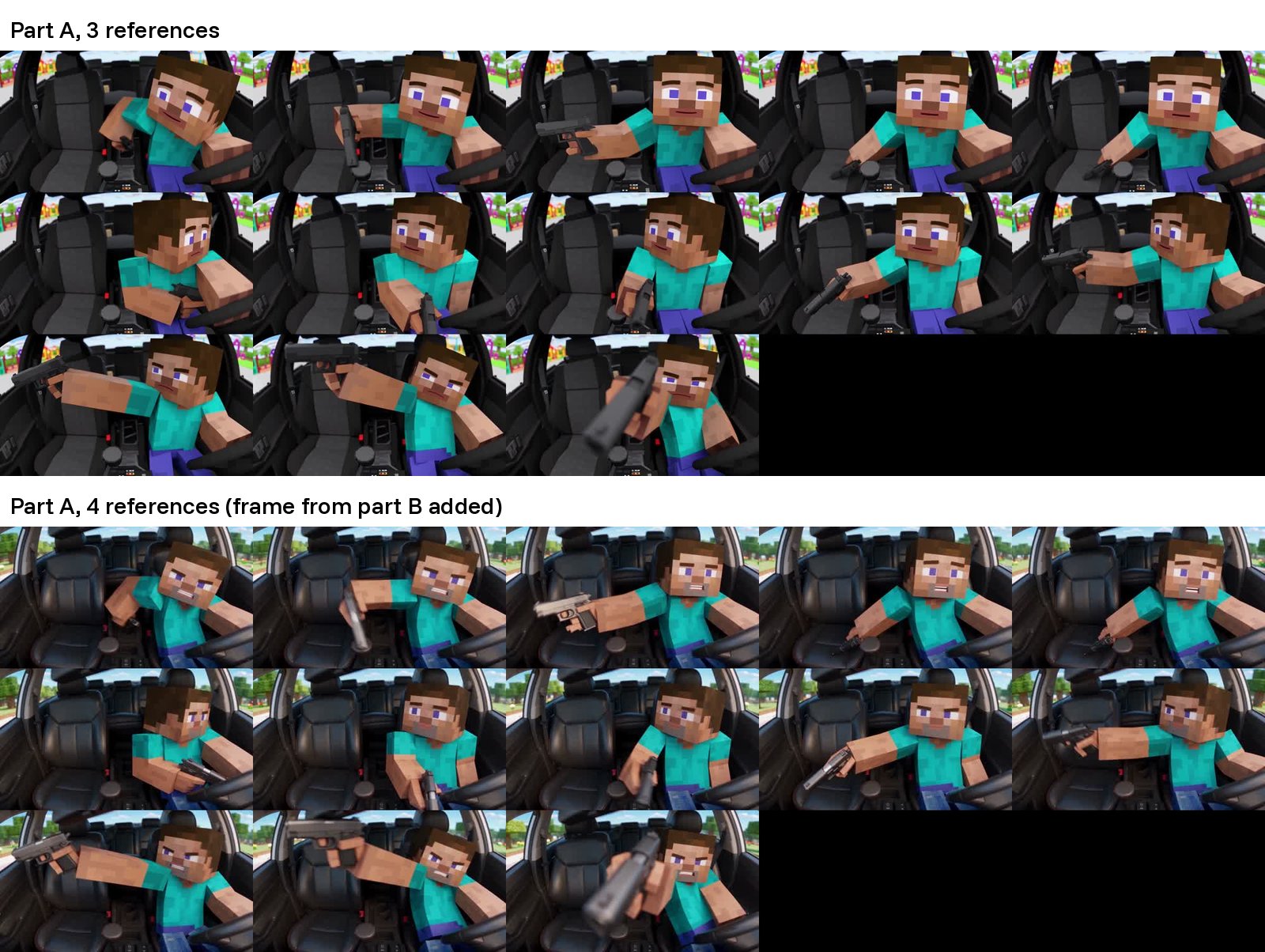
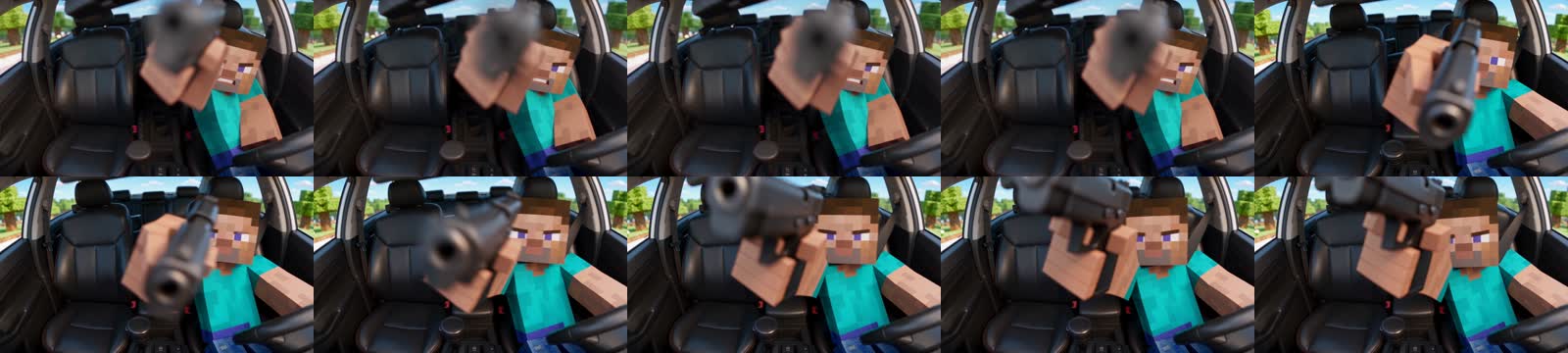
Same prompt, same references, and the halves didn't match. Part A kept a flat cartoon park outside and grey cloth seats. Part B came back with blocky Minecraft trees and black leather seats. A cut between them would jump.
The fix was to pick the half we liked and make it a reference. We took one frame of part B, the gun at the lens with Minecraft trees outside, and re-ran part A with it as a fourth reference image and a prompt that points at it:
Replace the cartoon girl driver with Minecraft Steve from the first three reference images: blocky cube head with the pixel-art face, cyan t-shirt, blue jeans, square blocky arms and hands. Match the car interior and outside view of the fourth reference image exactly: glossy black leather seats, black dashboard, and blocky Minecraft trees and grass outside the windows under a blue sky. Keep the exact same performance, timing, poses and camera framing as the source video. Steve keeps his Minecraft voxel look with crisp pixel textures throughout.
The re-run matched part B. Each Motion Transfer call cost $6.81 and took 433.9 to 506.7 s.
Top: part A with three references. Bottom: with a frame of part B added as a fourth.
The frame of part B that became the fourth reference image
6. Check every clip before you join it
Genjutsu's output doesn't always run at the source's length, and the first frames aren't always swapped. Measure each clip's length and look at its first and last frames.
These checks are ours, not the project's scripts:
# length of the source clip and of what came back
ffprobe -v error -show_entries format=duration -of csv=p=0 A_dancer.mp4
ffprobe -v error -show_entries format=duration -of csv=p=0 A_swap.mp4

# the first 12 frames as images, to spot unswapped ones
ffmpeg -i B_swap.mp4 -frames:v 12 b_%02d.png

# a contact sheet at 4 frames a second
ffmpeg -i B_swap.mp4 -vf "fps=4,scale=270:-1,tile=6x3" -frames:v 1 b_sheet.jpg
What we found in the Skyrim clips:
Clip A came back about 4% short of the 4.2 s source, so it needs a stretch of 1.0417 to line up with the source audio.
Clip B's first six frames (about 0.2 s) were still Harry. Genjutsu hadn't swapped them.
Clip B's last usable frames had a glitched hand on Ulfric: we lost six more frames there.
7. Put the clips back on the source's timing
Retime each clip so its beats land where the source's did, trim what's broken, and use the source's audio.
For the Skyrim reel:
Clip A is stretched by 1.0417 (setpts=PTS*1.0417).
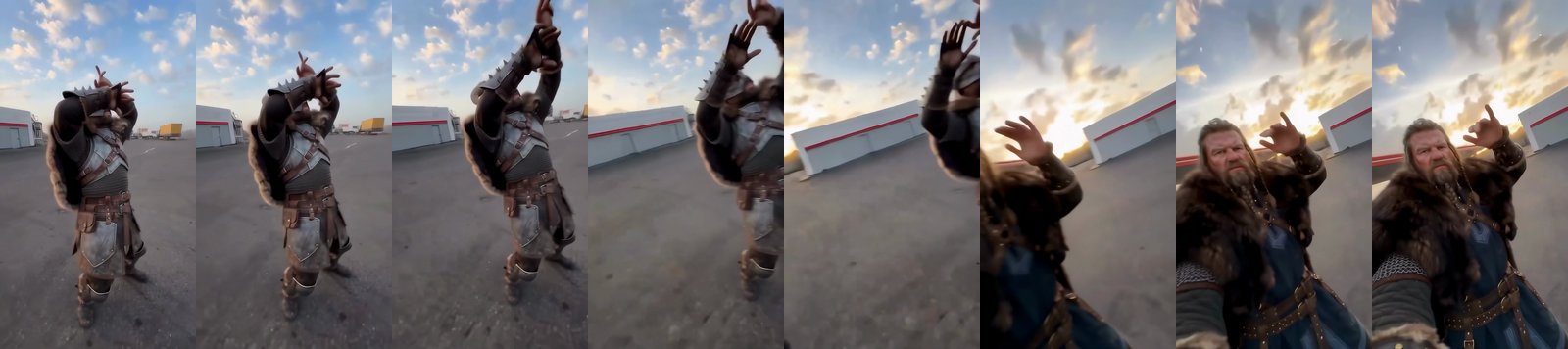
Clip B starts at frame 6, which is inside the hand-swipe blur, so the trim hides in the motion. A supplies the start of the whip with the Dragonborn, B finishes it with Ulfric. B is stretched by 1.03 to fit the gap.
Trimming B's end moved clip C 0.2 s earlier than the source cut: it starts at 6.13 s, not 6.3 s, and the reel is 14.8 s instead of 15.1 s.
Genjutsu returned 24 fps; the reel is 30 fps, so every clip is resampled with fps=30.
We checked alignment by comparing each clip's background with the source frame by frame: the whip's peak in the source, about 4.10 to 4.17 s, lands at 4.1 s in the edit.
Frame by frame through the whip: the Dragonborn, the blur, Ulfric's selfie
The whole edit is one command, from the project's build.sh. Inputs 0 to 2 are the upscaled clips and input 3 is the source reel, for its audio. The frame numbers are this reel's; yours come from the checks in step 6.
The Steve halves needed finer timing, because the joke lives on two gunshots. Part A was interpolated to 96 fps (ffmpeg's minterpolate=fps=96:mi_mode=mci), its first 5.03 s slowed by 1.0105 so the first muzzle flash lands at 5.083 s, and the rest stretched by 1.1917 so part A ends at 7.083 s. Then it went back to 24 fps. Part B starts two frames after 7.0 s, which puts its muzzle flash at 7.375 s, on the gunshot in the source audio at 7.37 s. The project records these settings, not the commands.
8. Join with a hard cut, not a dissolve
Where two generated halves meet, cut on a frame with heavy motion blur. A dissolve shows both versions of the character at once.
Our first Steve edit had a 4-frame dissolve at the join. In the final review it double-exposed Steve. A hard cut at 7.083 s, on a frame where the gun is a blur at the lens, hides the change.
The join at 7.083 s: the gun covers the frame, so the switch between halves doesn't read
For a 9:16 version of a 16:9 source, put the full picture on black instead of cropping. A 9:16 crop of a 1280x718 frame is about 404 pixels wide: too soft, and it loses the gun sweep. The Steve reel's vertical version is the master scaled to 1080x606 and placed 657 pixels down. In ffmpeg (our command for those numbers):
The fixes in steps 5 to 8 were the problems we solved. These stopped two other reels @rehan_shei asked for the same day, a Halo recast of @tisha_bimbo's Shrek reel and a Steve recast of another @tisha_bimbo reel:
Out of credits. Both Genjutsu jobs on the Halo reel failed at Higgsfield with "Your credit balance is too low", with no charge. Both on the second Steve reel failed too (logged as upstream_failed), for the same reason. Check your balance before you queue several clips.
A refusal from the fallback model. For the Halo reel we tried Seedance 2.5's video edit instead. ByteDance's output check refused it twice ("Output video has sensitive content"), once with a full-body Cortana reference and once with an armored, covered one, with no charge. Our guess is the character IP or the source footage. The second Steve reel did go through on Seedance 2.5 as a stand-in.
The result
The Skyrim reel is 14.8 s at 1080x1920 and 30 fps, plus Patch's end card, with Akcent's "Stay With Me" from the source reel. Logged generation costs: six reference calls at $0.236, three Object Swap calls at $3.18 and three upscales at $0.60, $12.76 in total.
The Steve reel is 14.1 s, delivered at 1920x1080 for X and 1080x1920 for Instagram. Logged generation costs: two reference calls at $0.236 and three Motion Transfer calls at $6.81, $20.90 in total, of which $6.81 was the part A that didn't match.
The API accepts up to 30 s, but our one long run, a 14 s clip in Motion Transfer, timed out after 1,200 s. Two 7 s halves finished in under 9 minutes each. Splitting means you have to match and join the halves (steps 5 and 8), so split where something covers the frame.
How much does it cost to swap a character in a video?
Our gateway billed $3.18 per Object Swap clip at 480p and $6.81 per Motion Transfer clip at the default 720p, the same for a 4.2 s clip as for an 8.7 s one. Higgsfield's web app lists 48 credits (about $2.35) for a 15 s Object Swap at 480p. References and upscales added $3.22 on the Skyrim reel and $0.47 on the Steve reel.
Why are the first frames of my swap still the old character?
In our Skyrim clip B, Genjutsu left the first 0.2 s (six frames) unswapped. Check the first frames of every clip, and start your source clip a little before the part you need so you can trim them.
Do I need a different reference for every shot?
Not for the same character. We sent the same two references per Skyrim character and the same three for every Steve half. What we added was a fourth reference for the environment, when two halves came back looking different.
Patch is where we put the AI-made mods, mashups and browser games we make.
Credits
Asked for by @rehan_shei. Made by @patch_gg. Source reels by @yanayudina_neuro (gas station, music: Akcent, "Stay With Me") and @ai.tezu (Masha with a pistol); the failed recasts were of reels by @tisha_bimbo. Models: Nano Banana 2.1 for references, Higgsfield Genjutsu Object Swap and Motion Transfer, Seedance 2.5, Topaz Video Upscale. Skyrim's characters belong to Bethesda; Steve belongs to Mojang.