Which image-to-3D model is best for game assets? Six models, $0.35 to $1.20 a mesh, tested in Blender: prices, triangle counts, renders and how to rerun it.
The best image-to-3D model for game assets depends on what you need from the mesh. At the settings we used, Meshy 7.1 made the lightest mesh (about 117,000 triangles, 2048 textures, $1.20). Tripo H3.1 made the densest (about 1.9 million triangles, 4096 textures, $0.60), and in clay its carving was sharper than Meshy's, so plan to decimate it. Rodin Gen-2.5 was the cheapest model we kept ($0.40, 500,000 triangles). Idol, the only open-weights model we tested, returns a Gaussian splat, not a mesh.
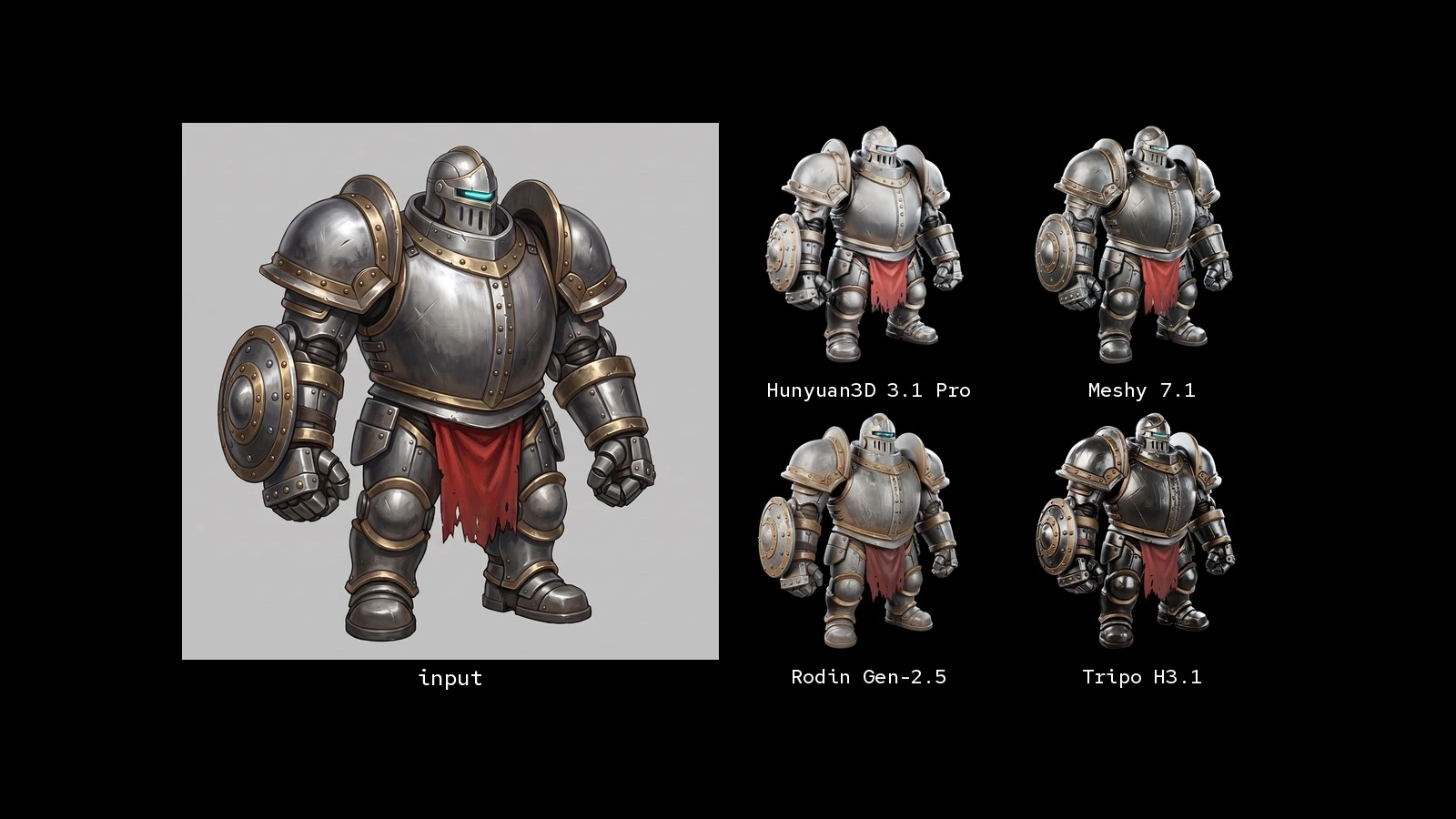
That comes from two tests Patch ran. In October, for @Christos_antono, one Nano Banana concept of a knight-robot went to Meshy 7.1, Hunyuan3D 3.1 Pro, Tripo H3.1, Rodin Gen-2.5 and TRELLIS.2, on one Blender rig. In November, for @rehan_shei, four new images (a knight, a chest, a mech and a sneaker) went to Meshy 7.1, Tripo H3.1 and Idol, on a second rig.
This article has the numbers, what each model got right and wrong, and every step of the method, so you can run the same test on your own art. We judged renders only: rigging, retopology and import into a game engine weren't tested. You should know Blender's basics and be able to run a Python script.
Which image-to-3D model is best? The numbers
Model
Output
Price
Time to file
Triangles
Textures
Meshy 7.1
textured mesh, GLB
$1.20
4m 23s
117,894
3 maps, 2048
Hunyuan3D 3.1 Pro
textured mesh, GLB
$0.675
4m 21s
499,576
3 maps, 4096
Tripo H3.1
textured mesh, GLB
$0.60
4m 18s
1,924,571
3 maps, 4096
Rodin Gen-2.5
textured mesh, GLB
$0.40
2m 10s
500,000
3 maps, 2048
TRELLIS.2
textured mesh, GLB
$0.35
2m 07s
493,324
2 maps, 2048, no normal map
Idol (Speridlabs)
Gaussian splat, PLY
not confirmed
not measured
none: 262,144 Gaussians
none: colour baked in
The first five rows are the knight-robot test of October 26, 2026. Prices are fal's list prices for our settings, the same on that day and on November 13, 2026. Times run from submitting the job to the finished GLB, so they include any time in the queue. Triangles and textures were counted in Blender after import. Idol's row is from the November 2 test; neither its price nor a fair time was recorded (step 3 says why).
The November test measured the files too. Same settings, four subjects each:
Model
Triangles
Textures
File size
Meshy 7.1
116,434 to 117,464
2048
12.7 to 16.7 MB GLB
Tripo H3.1
1,920,836 to 1,979,091
4096
64.0 to 69.0 MB GLB
Idol
none: 262,144 Gaussians
none: colour baked in
17.83 MB PLY
What each model did with the same knight, from the review of the renders:
Model
Best detail
Worst detail
Meshy 7.1
the shield
a smeared back plate and rear skirt
Hunyuan3D 3.1 Pro
the helm
a flat tabard
Tripo H3.1
the gauntlet
a rubbery back
Rodin Gen-2.5
the helm
chalky steel
TRELLIS.2
cut
green visor, faceted shading, no normal map
What you need
An image model for the inputs. We used Nano Banana 2.1 (google/nano-banana-2.1) for the knight-robot and Nano Banana Pro (fal-ai/nano-banana-pro) for the November set.
The image-to-3D models, each called through fal: meshy/v7.1/image-to-3d, fal-ai/hunyuan-3d/v3.1/pro/image-to-3d, tripo3d/h3.1/image-to-3d, fal-ai/hyper3d/rodin/v2.5, fal-ai/trellis-2 and speridlabs/idol.
Blender 5.2 with Cycles on a GPU, for the turntables.
gsplat, only if you test a model that returns Gaussian splats.
Budget: the five October models cost $3.225 at list price for one image. In November, the 13 3D jobs (four subjects, three models, one rerun) come to $4.80 for Meshy 7.1 and $3.00 for Tripo H3.1 at list price, plus Idol's four jobs, whose price we couldn't confirm. The eight input images cost $1.20.
1. Make one clean input image
Every model has to start from the same pixels, so make one image that's easy to read: one object, whole, centred, on a flat background, at a three-quarter angle so the model sees a front and a side.
The knight-robot came from google/nano-banana-2.1 with {"num_images": 4, "aspect_ratio": "1:1", "resolution": "2K"} and this prompt:
Original video game character concept art: a chunky armoured knight-robot, full body head to feet, standing in a neutral heroic pose, front three-quarter view (turned about 30 degrees to the viewer's left), whole figure centred with margin around it. Stocky, heavy proportions: oversized rounded pauldrons, a barrel chest plate with riveted seams, a visored great-helm head with a single glowing cyan eye slit, segmented armoured arms with big mechanical gauntlets, thick stubby legs with heavy sabatons. Brushed steel and gunmetal plates with worn brass trim, a short red cloth tabard at the waist, a round shield strapped to the left forearm. Stylised, high-detail game asset look, clean readable silhouette, physically based materials, soft even studio light, no cast shadow. Plain flat light grey background, nothing else in the frame, no text, no logo, no ground plane.
Two of them then went through Nano Banana's edit endpoint, two edits each, with "Same exact character, same design, materials, colours and art style, but turned to a clear front three-quarter view: body rotated about 35 degrees so we see the front and the character's right side". One of those four edits became the input; the project doesn't record why that one. It ended up turned toward the viewer's right, not the left the first prompt asked for, which matters in step 4.
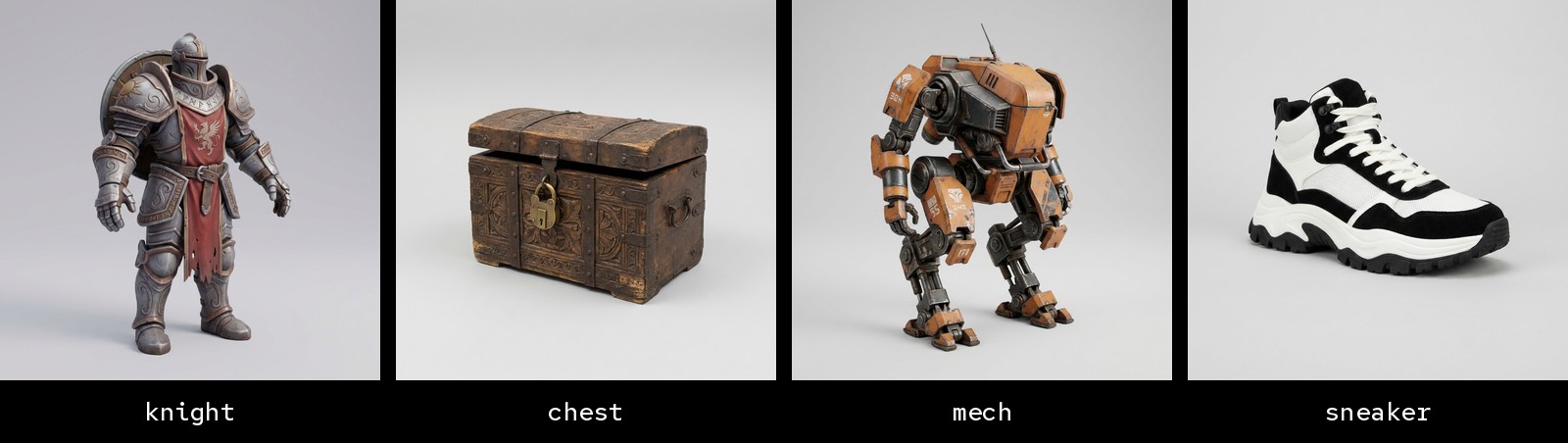
For the November set, fal-ai/nano-banana-pro made two images per subject with {"aspect_ratio": "1:1"}, and one of each pair was kept. These are the four prompts, word for word:
A stylised fantasy knight game character standing in A-pose-ish idle stance, chunky armour with engraved trims, a red cloth tabard, a round shield on the back, hand-painted game-art look. single object centred, full object visible with margin, three-quarter view, plain light grey studio background, soft even lighting, no shadow clutter, no text, product reference image for image-to-3D
An ornate wooden treasure chest with riveted iron bands, a brass lock, worn edges, lid slightly closed, game prop. single object centred, full object visible with margin, three-quarter view, plain light grey studio background, soft even lighting, no shadow clutter, no text, product reference image for image-to-3D
A small bipedal sci-fi walker mech robot, hard-surface panels, exposed pistons, antenna, orange and gunmetal paint with decals worn off, game asset. single object centred, full object visible with margin, three-quarter view, plain light grey studio background, soft even lighting, no shadow clutter, no text, product reference image for image-to-3D
A chunky high-top sneaker with mesh, suede overlays, thick sole with tread, laces, white with black accents. single object centred, full object visible with margin, three-quarter view, plain light grey studio background, soft even lighting, no shadow clutter, no text, product reference image for image-to-3D
Everything after the first full stop is the suffix we used on all four.
The November inputs. Each went, unchanged, to all three models.
2. Send the same image to every model at once
Submit every job at about the same time, with textures on and each model's quality options turned up. Running them together keeps conditions as alike as you can make them, though queue time still differs (step 3).
These are the parameters we sent, word for word, alongside the image:
The five October jobs went in between 19:06:45 and 19:06:51 UTC, with no seeds. The November jobs went in between 22:00:13 and 22:05:11 UTC with seed 7: "seed": 7 for Meshy, "model_seed": 7, "texture_seed": 7 for Tripo, and {"image_type": "synthetic", "seed": 7} for Idol (synthetic, because the inputs were generated images, not photos).
Meshy's polycount is a setting too: target_polycount, which fal lists with a default of 30,000. We didn't set it, and Meshy still came back at about 117,000 triangles every time; the project doesn't say why, so set it yourself and count after import. Hunyuan3D's is face_count, which we set to 500,000.
We called fal through Patch's internal gateway, which logs every job. Calling fal directly looks like this in Python (an illustration, not our script):
Swap the endpoint and the arguments from the JSON above for each model, and check each model's output fields on its fal page.
What comes back: Meshy 7.1 returns a GLB plus FBX, OBJ, USDZ and STL and its texture maps. Hunyuan3D returns a GLB and an OBJ with its material. Tripo H3.1, Rodin and TRELLIS.2 each return a GLB. Idol returns a .ply splat and a preview GLB.
3. Record price and time the honest way
Write down the price from each model's own fal page for the exact options you used, not what your account was charged, and time each job from submission to the finished file.
Two things bent our numbers, and they will bend yours:
Billing isn't list price. Our gateway billed the four non-Meshy October jobs at a $0.50 placeholder. The table uses fal's list prices instead: Hunyuan3D 3.1 Pro is $0.375 plus $0.15 for PBR plus $0.15 for a custom face count; Tripo H3.1 is $0.40 for HD textures plus $0.20 for detailed geometry; Meshy 7.1 is $0.80, $1.20 with textures. In November the gateway charged $9.40 for the 13 3D jobs, with Tripo and Idol at the same placeholder.
Wall clock includes the queue. In October, Meshy, Hunyuan3D and Tripo finished within the same five-second polling window, so their times may be a few seconds high. In November the gateway's times included queue time, so they measured the queue as much as the model, and we didn't publish them. Idol's price on our gateway was a placeholder too, so it isn't in the table.
If a number can't be fair, leave it out. A comparison is only as good as its worst column.
4. Import every GLB into one Blender rig
Import each file without editing it and normalise it the same way: same height or same bounding sphere, base on the floor, centred on the turntable. Models come back at arbitrary sizes and orientations; Meshy's knight arrived 1.903 m tall and Hunyuan3D's 1.012 m. (The October importer loads Meshy's GLB from a file the project calls model_trunc.glb; it doesn't record what was trimmed. Meshy's November files, loaded as returned, came in at the same triangle count.)
The October import script (import_model.py) parents each model under a Turntable empty, rotates it to face the camera, scales it to 2.0 m and sits it on z = 0:
bpy.ops.import_scene.gltf(filepath=glb)
root.rotation_euler = (0, 0, math.radians(yaw))   # per-model offset so the front faces the camera
lo, hi = world_bbox()
s = HEIGHT / (hi.z - lo.z)                        # HEIGHT = 2.0 m
root.scale = (s, s, s)
lo, hi = world_bbox()
ctr = (lo + hi) / 2
root.location = (-ctr.x, -ctr.y, -lo.z)           # centred on the axis, feet on the floor
world_bbox() reads the evaluated bounding box of every imported mesh. The yaw offsets live in a JSON file: every model needed 0 degrees except Tripo H3.1, which came in facing sideways and needed -90. A second script, torso_recentre.py, then moves each model so the spin axis passes through its torso instead of its bounding-box centre: it takes the vertices between 0.9 and 1.6 m high and shifts the model by minus their mean x and y. The rig's frame 1 is turned 30 degrees so it matches the angle of the input image.
The November rig normalises to a bounding sphere of radius 1.0 instead of a height, which suits props of very different shapes (a sneaker and a mech). It also stores a per-clip offset so each turntable starts at the same angle as Meshy's.
5. Light and frame every model the same way
Use one camera and one set of lights for every model, and never move them. The model turns; the light stays put.
The October rig, from step_01_rig.py:
Cycles on the GPU, 1080x1080, 24 fps, 192 frames for one full turn, 64 samples with adaptive sampling at 0.02, OpenImageDenoise, AgX view transform.
A 55 mm camera at (0, -3.75, 1.35) aimed at z = 0.9.
Four area lights: a key at 900 W, a fill at 260 W and two rims at 1100 W each.
A world that lights the model with a studio HDRI at strength 0.35 but shows black to the camera:
nt.links.new(env.outputs["Color"], bg_h.inputs["Color"])          # HDRI, strength 0.35
nt.links.new(lp.outputs["Is Camera Ray"], mix.inputs["Fac"])      # Light Path node
nt.links.new(bg_h.outputs["Background"], mix.inputs[1])           # what the model sees
nt.links.new(bg_k.outputs["Background"], mix.inputs[2])           # what the camera sees: black
The November rig is simpler on purpose: a uniform white world at strength 0.6, one 4 m square area light at 600 W placed 45 degrees left of the camera and 45 degrees up, a 50 mm lens at 12 degrees of elevation, and a flat #1C1C1C background. The turntable spins with a driver, (frame - 1) * 0.034906585039886591, which is 2 degrees a frame, so 180 frames at 30 fps is exactly one 6-second loop.
One rig, one turn, four models.
6. Render a clay pass to see the geometry
Render every mesh a second time with one plain grey material. Textures hide a lot; clay shows what the model actually built.
The November clay material is a Principled BSDF in #B3B3B3 at roughness 0.6, with Blender's Wireframe node (1 pixel wide, at 0.5 opacity) darkening the edges so the topology reads:
WIRE_PX, WIRE_OPACITY = 1.0, 0.5
wf = nt.nodes.new('ShaderNodeWireframe'); wf.use_pixel_size = True
wf.inputs['Size'].default_value = WIRE_PX
mixc.inputs['A'].default_value = (0.4508, 0.4508, 0.4508, 1)   # #B3B3B3 in linear
mixc.inputs['B'].default_value = (0.004, 0.004, 0.004, 1)      # edge colour
mul.inputs[1].default_value = WIRE_OPACITY
nt.links.new(wf.outputs['Fac'], mul.inputs[0])
nt.links.new(mul.outputs[0], mixc.inputs['Factor'])
for o in meshes:
    o.data.materials.clear(); o.data.materials.append(clay)
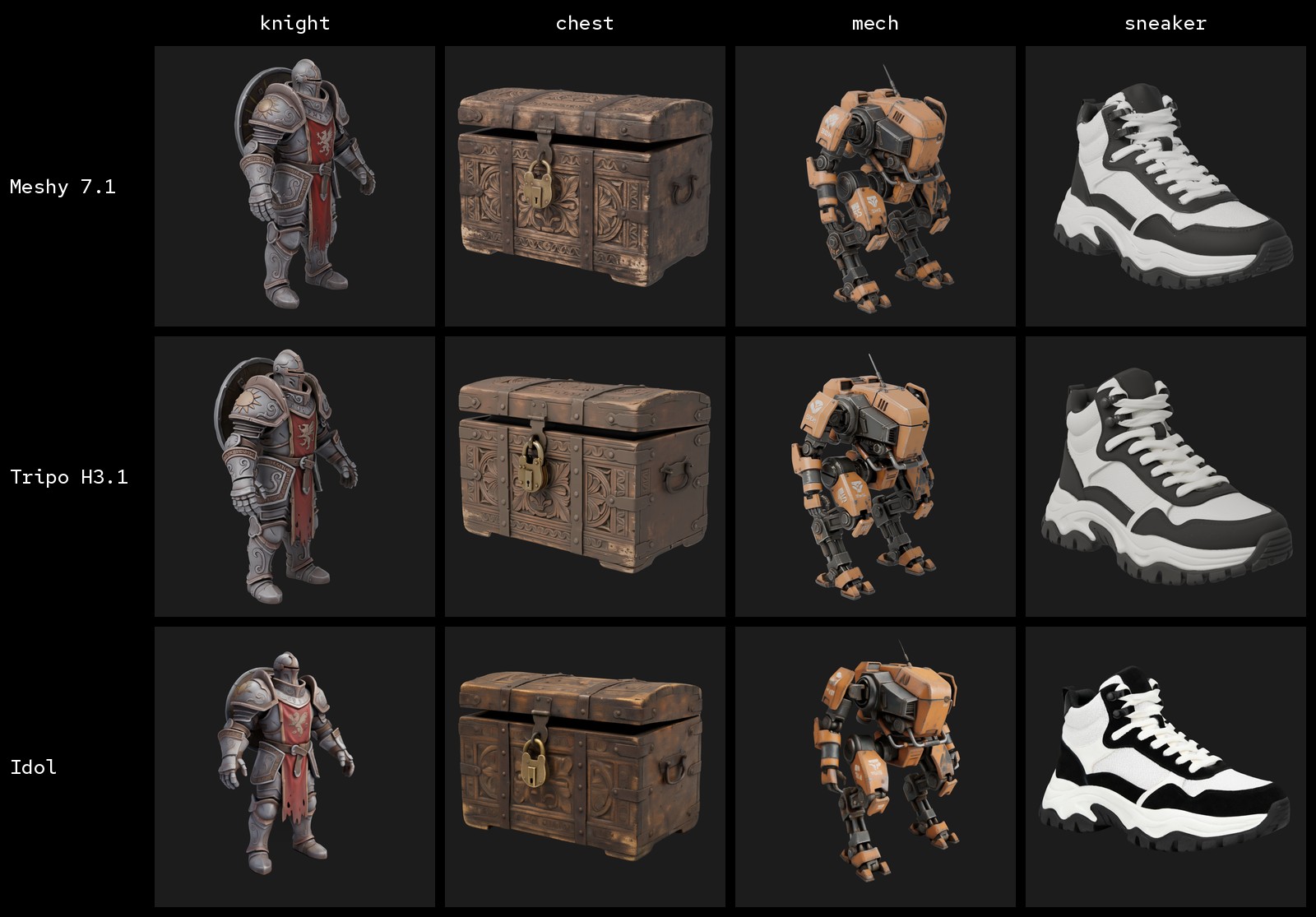
Textured, one row per model. Tripo H3.1 reads a little greyer than Meshy 7.1.
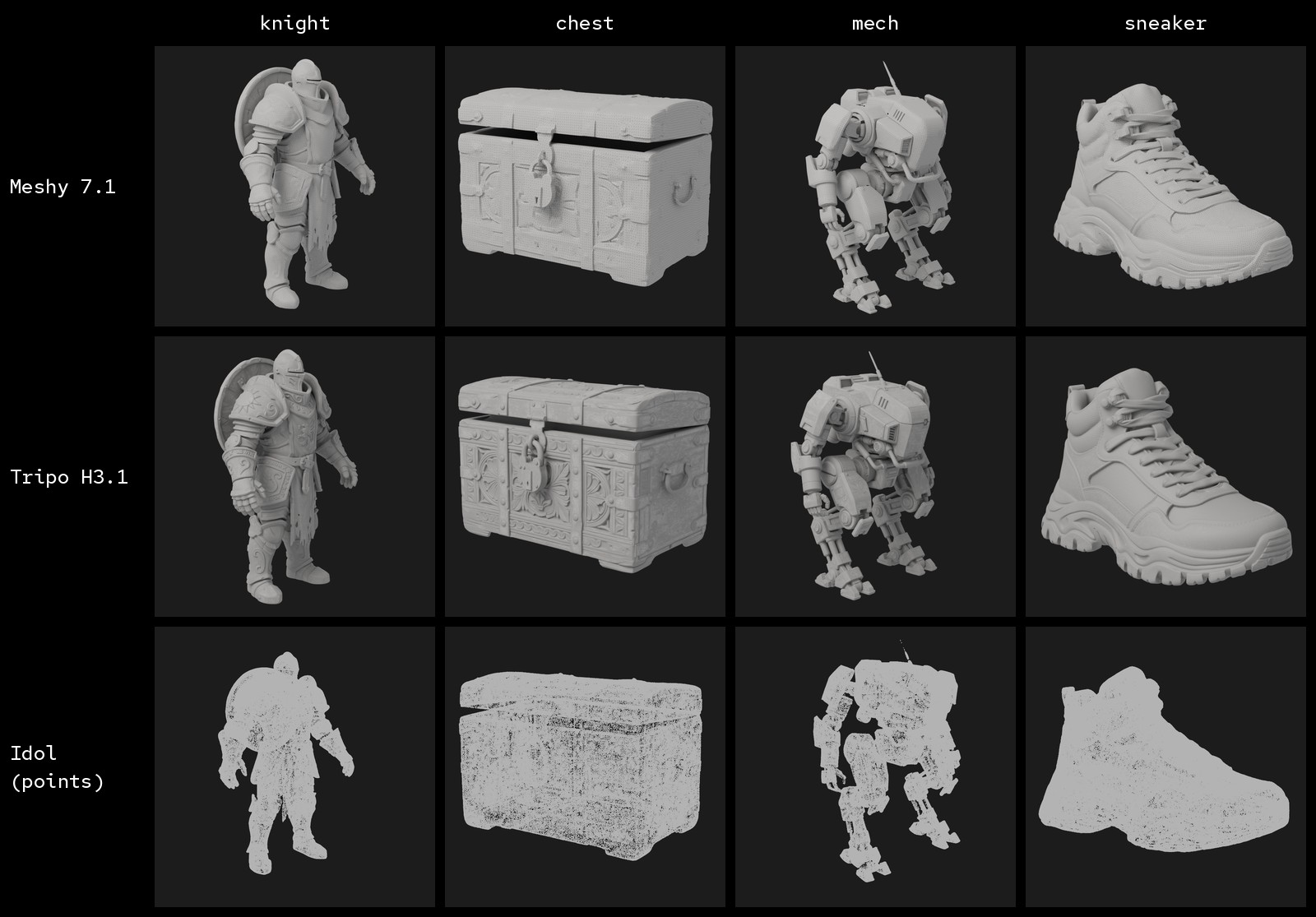
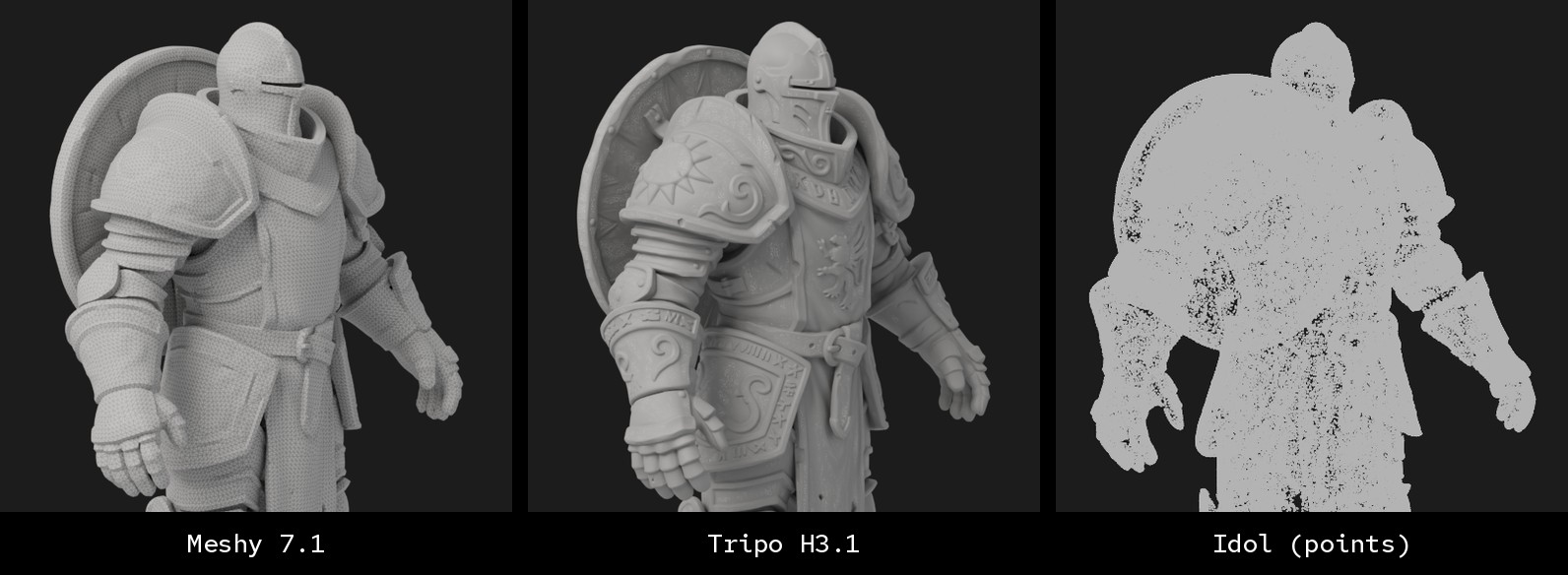
The same renders in clay, with the textures off.
In the clay pass the chest's carving and the mech's panel lines are deeper and sharper on Tripo H3.1 (about 1.9 million triangles) than on Meshy 7.1 (about 117,000). Idol has no surface to shade, so its row is points.
7. Render Gaussian splats with gsplat
If a model returns a splat, render it with a splat rasterizer on the same camera, background and turn. Blender's mesh pipeline can't light a splat; its colour is baked in, so it renders unlit.
We rendered Idol's .ply files with gsplat 1.5.3 on a GPU box. Its torch image had Python 3.12, torch 2.14 and CUDA 13, and gsplat has no prebuilt wheel for that, so the script builds its own environment first:
Three details make a splat match the mesh renders:
Axes. Idol's PLY uses OpenCV axes (y down), so it's rotated into Blender's z-up before anything else.
Normalise on a percentile box. A few stray Gaussians far from the object would shrink it, so the bounding box uses the 1st to 99th percentile of the Gaussian centres with opacity above 0.1.
Match on-screen size. Normalising on a percentile box left the splats at a different on-screen height from the meshes, so the Idol panels were zoomed 1.03 to 1.13 times to match. The turntables were also offset per clip so all three start at Meshy's angle.
The core of idol_turntable.py, trimmed: read the PLY, turn its raw values into what gsplat expects, normalise, and rasterize from the same camera as the meshes.
xyz = ply["xyz"] @ UP["ydown"].T                   # OpenCV y-down to Blender z-up
op = 1 / (1 + np.exp(-ply["opacity"]))             # stored as logits
m = op > 0.1
lo, hi = np.percentile(xyz[m], 1, axis=0), np.percentile(xyz[m], 99, axis=0)
c = np.array([(lo[0] + hi[0]) / 2, (lo[1] + hi[1]) / 2, lo[2]])
s = 1.0 / (0.5 * np.linalg.norm(hi - lo))          # bounding-sphere radius 1.0
means = (s * (xyz - c)) @ rz(yaw).T
scales = np.exp(ply["scale"]) * s                  # stored as logs
sh = ply["f_dc"][:, None, :]                       # SH degree 0: one colour per Gaussian

rgb, alpha, _ = rasterization(means, quats, scales, op, sh, viewmats, Ks, w, h,
                              sh_degree=0, near_plane=0.01, render_mode="RGB")
quats are the PLY's rotations, normalised and turned by the same up and yaw rotation. The script takes the up axis and yaw per subject as JSON, for example {"knight": {"up": "ydown", "yaw": 90}}.
The "clay" pass for a splat draws each Gaussian centre as a small #B3B3B3 point, which is all the geometry a splat has.
Two meshes and a splat on one turn.
Idol has no surface to sculpt: 262,144 points.
8. Zoom into the same parts on every model
Pick three or four parts and zoom every model into each one with the same camera move. A full-body turntable flatters everyone; a close-up on a hand shows who modelled fingers.
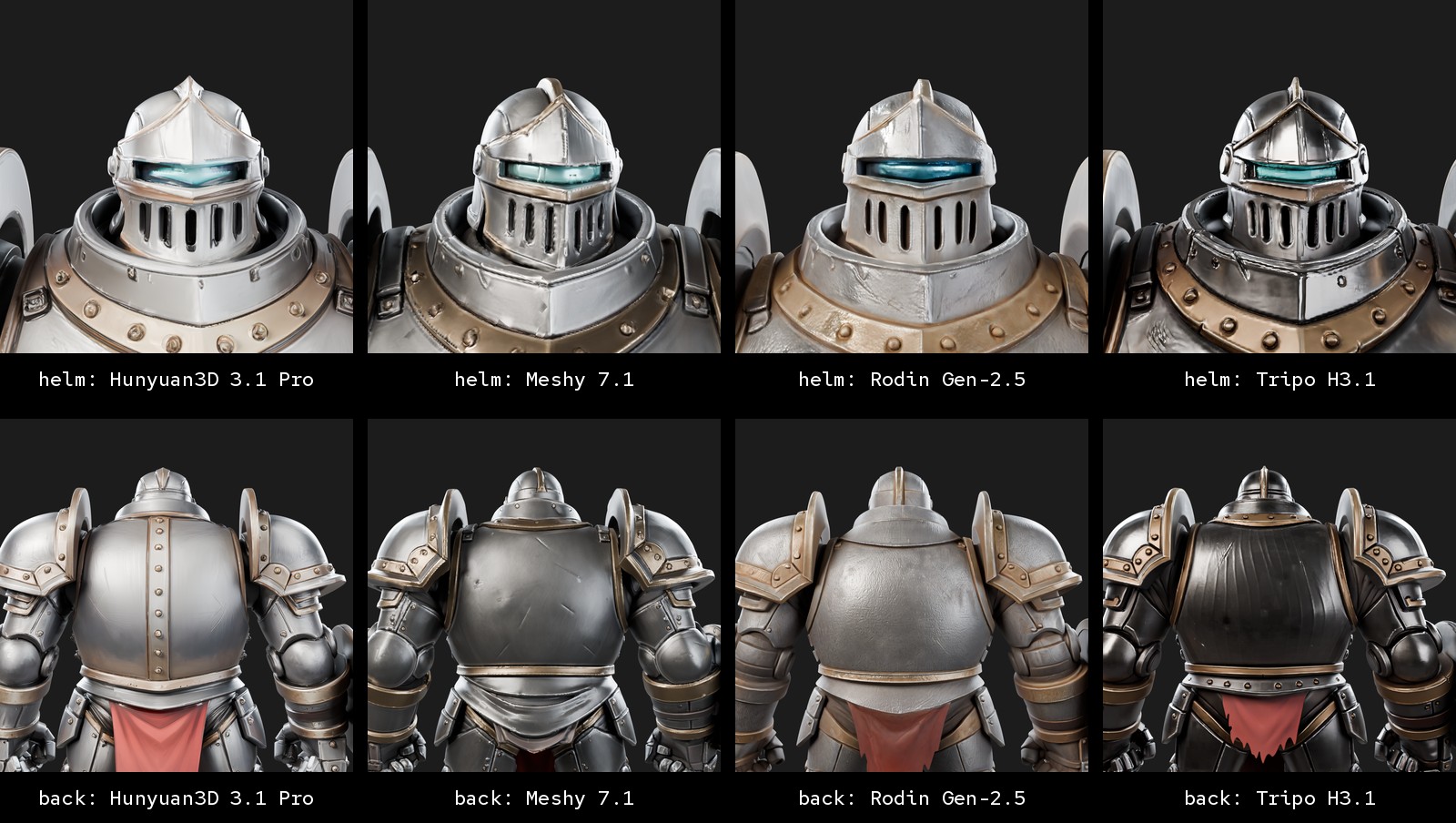
The October test zoomed on the helm, the shield, the gauntlet and the back. Each zoom is 57 frames: it starts from the turntable framing at that part's pose, eases in over 12 frames while the lens goes from 55 to 75 mm, then holds with a slow 5% push, the part filling 58% of the frame. The back is the most telling part: it isn't in the input image at all, so every model had to guess it.
The helm was in the picture. The back wasn't.
That's where the best and worst details in the table at the top came from: Meshy 7.1's back plate smeared and Tripo H3.1's back went rubbery, while Hunyuan3D and Rodin both did their best work on the helm.
What went wrong
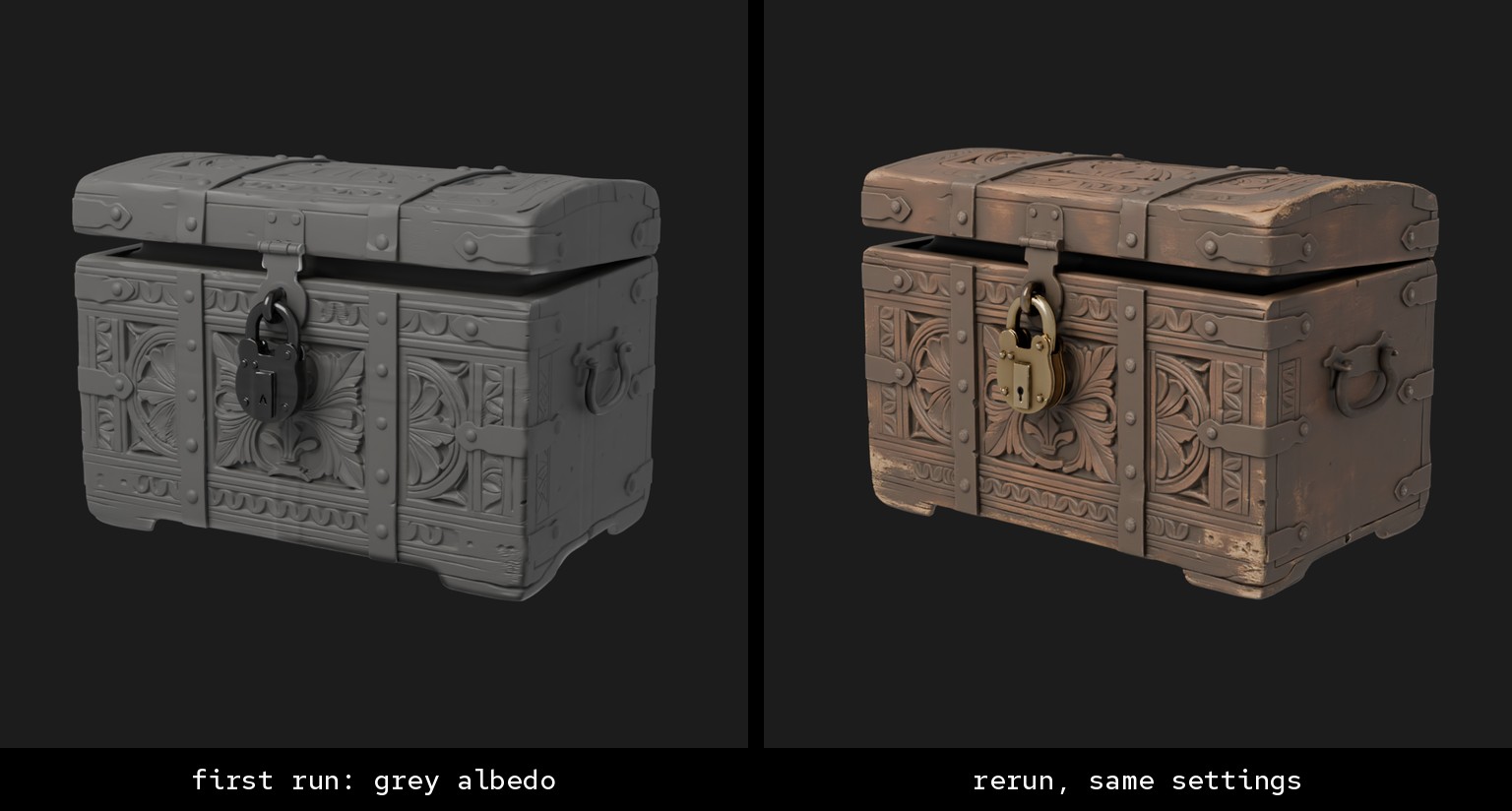
Tripo H3.1's first chest came back grey. The texture inside the GLB was flat grey. A rerun with identical settings came back textured and is the one we used. If a model's output looks oddly plain, open the GLB's texture before you judge it.
Tripo H3.1 faced sideways. Its knight needed a -90 degree turn to face the camera. Check every model's front before you render.
Tripo H3.1 reads near-black. That's genuine: its own preview is dark too, so we didn't correct it. Don't brighten one model to be kind.
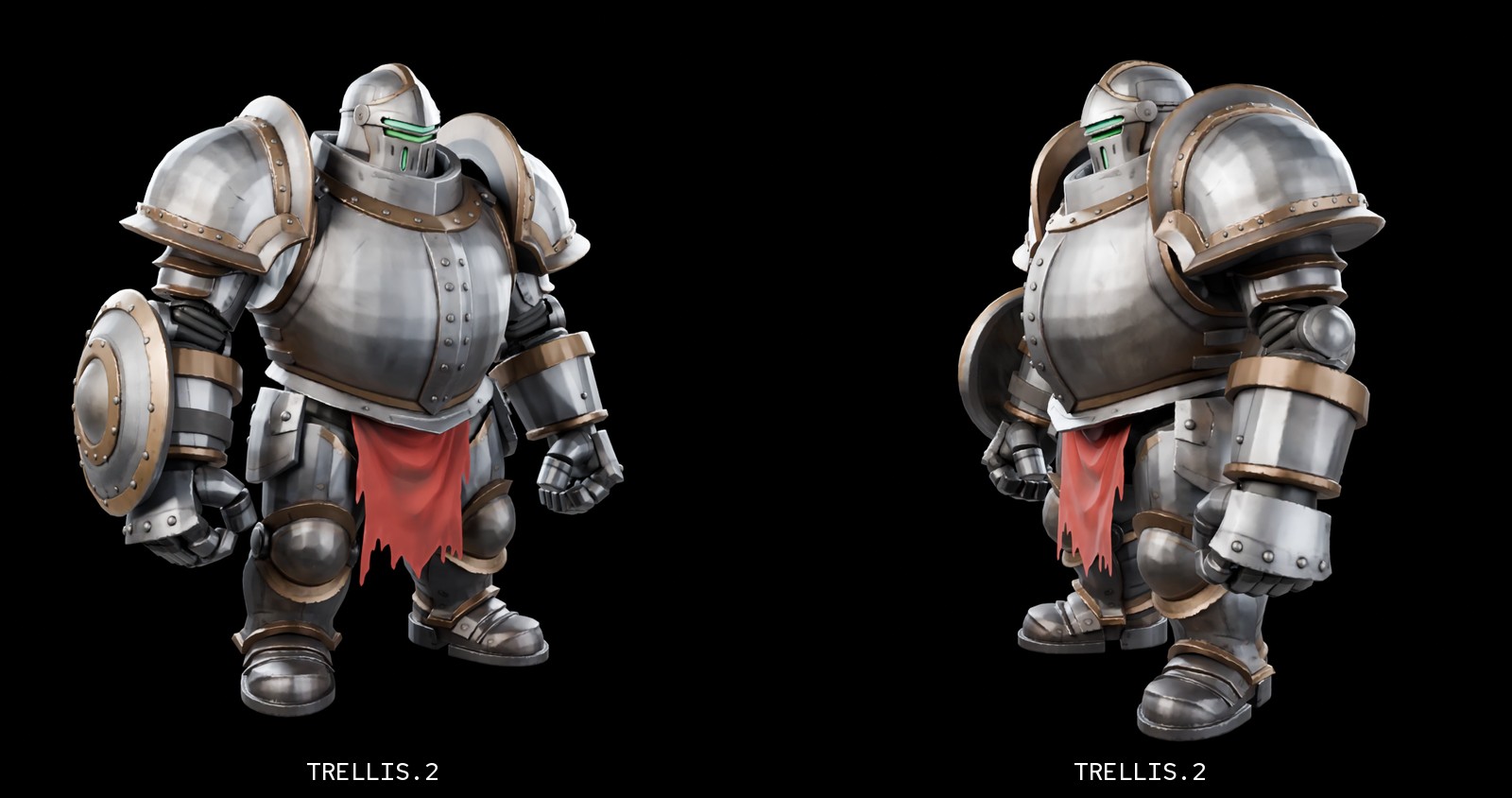
TRELLIS.2 didn't make the cut. It returned a green visor, faceted shading and no normal map, so it was dropped from the October grid. It's still in the table so you can see what it cost.
The input wasn't turned the way the prompt said. Nano Banana turned the knight to the right, not the left. The rig's frame 1 follows the image, not the prompt.
gsplat failed twice before it ran. The first two Idol render jobs on the GPU box failed, and the third ran. The log doesn't record why; if yours fails, check the Python, torch and CUDA versions first.
TRELLIS.2: the visor came out green, not cyan.
The same image and settings, run twice.
The result
Four of the five October models made a knight-robot you could put on a turntable next to the concept, for $0.40 to $1.20 each, in 2m 10s to 4m 23s from submission to file. The differences are in the parts the image didn't show and in what you'd carry into a game: about 117,000 triangles and a 13 to 17 MB GLB from Meshy 7.1, about 1.9 million and 64 to 69 MB from Tripo H3.1.
Common questions
Which image-to-3D model is cheapest?
In our October test, TRELLIS.2 was the cheapest at $0.35 at fal's list price, and Rodin Gen-2.5 was the cheapest of the four we kept at $0.40. Meshy 7.1 cost the most at $1.20 with textures.
Which image-to-3D model makes the lowest-poly mesh?
At our settings, Meshy 7.1, at about 117,000 triangles on every subject we tried. Tripo H3.1 with detailed geometry made about 1.9 million, more than 16 times as many. Hunyuan3D 3.1 Pro, Rodin Gen-2.5 and TRELLIS.2 all landed near the 500,000 we asked for. Polycount is a setting on most of these models, so set a target before you compare.
Is a Gaussian splat usable as a game asset?
Not as a mesh. Idol returns 262,144 Gaussians with colour baked in and no triangles. We didn't test lighting, rigging or collision on it, but none of a GLB's usual tools for those apply until you convert it. Its weights are open, so you can run it yourself.
How do I compare image-to-3D models fairly?
Use the same input image, the same quality options for every model, a fixed seed where the model takes one, one Blender rig, a clay pass, and the same close-ups for every model. Record list prices and say what your times include.
More of what Patch makes with these models, from mods to browser games, is on patch.gg.
Credits
The knight-robot faceoff was asked for by @Christos_antono and the Idol showdown by @rehan_shei. Both were run by @patch_gg. Models: Nano Banana 2.1, Nano Banana Pro, Meshy 7.1, Hunyuan3D 3.1 Pro, Tripo H3.1, Rodin Gen-2.5, TRELLIS.2 and Idol by Speridlabs. Rendered in Blender 5.2 with Cycles and with gsplat.